【问题】
在折腾:
【已解决】ADT中,运行Android程序出错:The connection to adb is down, and a severe error has occured
的过程中,去安装HAXM:
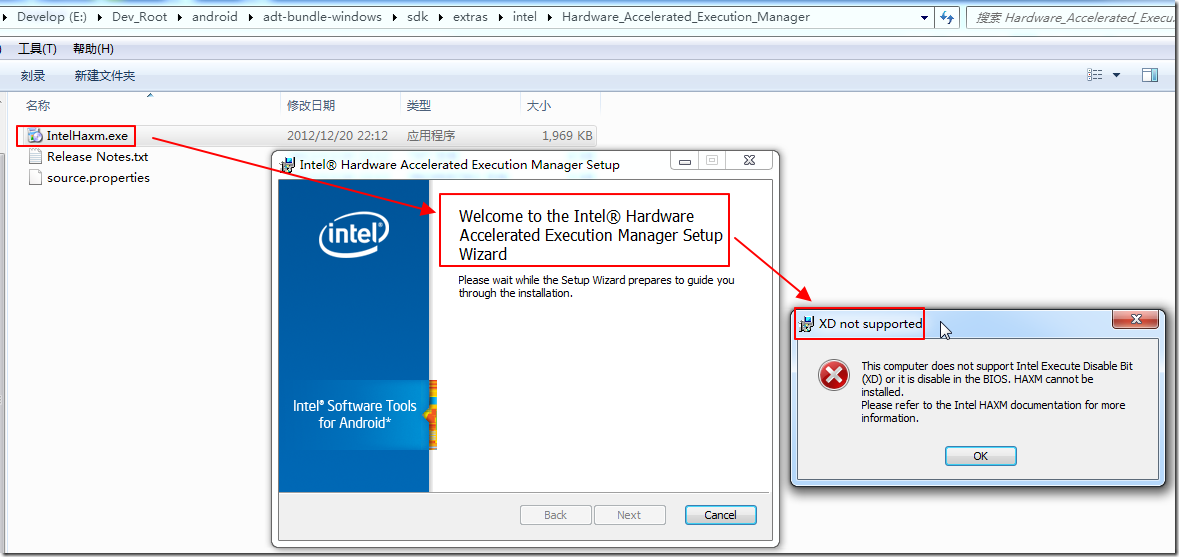
E:\Dev_Root\android\adt-bundle-windows\sdk\extras\intel\Hardware_Accelerated_Execution_Manager\IntelHaxm.exe
结果出错:
XD not supported
This computer does not support Intel Execute Disable Bit (XD) or it is disable in the BIOS
HAXM cannot be installed
【解决过程】
1.看起来,像是Intel的虚拟化技术,被我的BIOS中禁用了。
所以,只能去重启电脑,进BIOS中去开启一下了。
2.结果悲催了。
重启F2,进入BIOS,结果愣是没有找到关于VT-x,虚拟化,和那个Execute Disable (XD) Bit方面的任何设置。
因为CPU一项,根本就没得设置。。。
郁闷了,那意味着就是BIOS中,没法开启这些项了。
3.后来去Intel主页,找到了我当前的I3 M380的详细解释:
http://ark.intel.com/products/50178/Intel-Core-i3-380M-Processor-3M-Cache-2_53-GHz
证实是的确支持这些特性的:
No No Yes Yes No No No Yes Yes Yes Yes Yes Yes Yes Yes
4.后来看了半天别人的讨论:
HAXM installation does not detect Execute Disable (XD) Bit
[Win7 64bit] Intel HAXM locks the VT-X module
但是对于我这里没太大用,因为我的BIOS中,没法开启设置。。。
5.再去Intel官网找找,是否有新版本。
http://software.intel.com/zh-cn/articles/intel-hardware-accelerated-execution-manager/
后来从
http://software.intel.com/zh-cn/android/
->
找到:
http://software.intel.com/zh-cn/articles/intel-hardware-accelerated-execution-manager/
->
http://software.intel.com/sites/default/files/m/9/3/5/extra_intel_haxm-windows_r02.zip
下载下来, 发现也是Version 1.0.1的1969KB的IntelHaxm.exe。
还是同样问题,没法安装。
6.想要去找我的K470 i3 D2的新版本的BIOS,结果也没找到。
官网主页中:
http://www.hasee.com/cn/QuIndex_Views.html?qutong=1&qu=6&productid=2848
也找不到BIOS下载。
不过,另外在
中找到一个K470 i3 D1的:
H41IA
1.01.00.H
中文神舟HASEE LOGO
优雅 A470-i3 D1| 优雅 A470-P61 D1| 精盾K470-i3 D1| 精盾K470-i5 D1| 精盾K470-i7 D1|
下载
7.去用EverestUltimatePortable,找到BIOS项:
项目 数据
BIOS 属性
BIOS 类型 Phoenix
BIOS 版本 1.01.00.H
系统 BIOS 日期 08/17/10
视频 BIOS 日期 08/04/10
BIOS 制造商
公司名称 Phoenix Technologies Ltd.
产品信息 http://www.phoenix.com/en/products/default.htm
BIOS 升级 http://www.esupport.com/biosagent/index.cfm?refererid=40
问题和建议
建议 Are you looking for a BIOS Upgrade? Contact eSupport Today!
建议 系统 BIOS 已是两年以前的,如果可能请更新.
建议 视频 BIOS 已是两年以前的,如果可能请更新.
提示也许可以升级,
所以去:
http://biosagentplus.com/?ref=40
转到:
http://biosagentplus.com/scan/download/msie
去下载了:
biosagentplus_40.exe
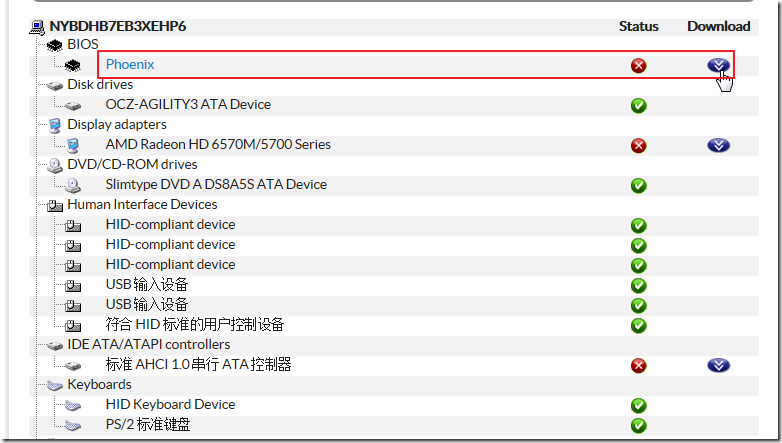
去运行看看。
结果还真是发现有BIOS可更新的:
然后去:
http://biosagentplus.com/basics/request/5f3f9b3226ae18e8f0b270d356e2f917
下载。
但是没找到可以下载的。
8.自己去搜
EHA4
找到
从
http://nbbbs.zol.com.cn/41/1191_409716.html
找到了
http://nbbbs.zol.com.cn/41/1191_409628.html
找到:
9.这人:
http://nbbbs.zol.com.cn/40/1191_395290.html
也是和我一样,BIOS中没有找到虚拟化的配置。。。
10.
【总结】
目前悲催了,BIOS中,没有开启相关设置,导致HAXM无法安装。。。
估计即使找到那个最新的1.04.00H的BIOS,貌似也没有虚拟化的设置的。。。
转载请注明:在路上 » 【未解决】安装HAXM时出错:XD not supported,This computer does not support Intel Execute Disable Bit (XD) or it is disable in the BIOS