【背景】
折腾:
期间,下载和安装go,运行了hello world后,就是去参考官网:
去学习,如何写go代码了。
【折腾过程】
1.go语言中,用来获取,编译,安装go语言包的标准工具,是:go命令
2.关于go命令,去看看go help的输出:
D:\tmp\tmp_dev_root\go\helloworld>go help
Go is a tool for managing Go source code.

Usage:

        go command [arguments]

The commands are:

    build       compile packages and dependencies
    clean       remove object files
    doc         run godoc on package sources
    env         print Go environment information
    fix         run go tool fix on packages
    fmt         run gofmt on package sources
    get         download and install packages and dependencies
    install     compile and install packages and dependencies
    list        list packages
    run         compile and run Go program
    test        test packages
    tool        run specified go tool
    version     print Go version
    vet         run go tool vet on packages

Use "go help [command]" for more information about a command.

Additional help topics:

    gopath      GOPATH environment variable
    packages    description of package lists
    remote      remote import path syntax
    testflag    description of testing flags
    testfunc    description of testing functions

Use "go help [topic]" for more information about that topic.


D:\tmp\tmp_dev_root\go\helloworld>
3.用go命令的话,需要你按照特定的方式去安排组织你的代码。
4.感兴趣的,可以看官网录制的视频教程:
[Video] Writing, building, installing, and testing Go code
5.go代码必须是在一个workspace内。
workspace是一个文件夹(目录),其包含三个子文件夹:
- src:包含go的源码
- pkg:包含package的目标文件
- bin:包含可执行的命令
go命令,就是去编译(src内的)源码包,并且安装生成二进制到pkg和bin中。
一个典型目录结果是这样的:
bin/
    streak                         # command executable
    todo                           # command executable
pkg/
    linux_amd64/
        code.google.com/p/goauth2/
            oauth.a                # package object
        github.com/nf/todo/
            task.a                 # package object
src/
    code.google.com/p/goauth2/
        .hg/                       # mercurial repository metadata
        oauth/
            oauth.go               # package source
            oauth_test.go          # test source
    github.com/nf/
        streak/
            .git/                  # git repository metadata
            oauth.go               # command source
            streak.go              # command source
        todo/
            .git/                  # git repository metadata
            task/
                task.go            # package source
            todo.go                # command source
6.开发go的话,需要设置,唯一一个环境变量:GOPATH
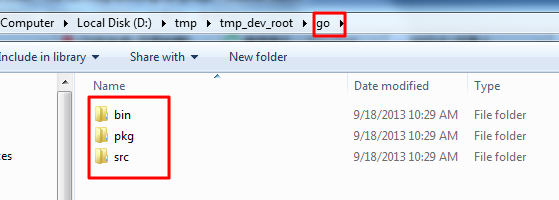
去把此处我的go的目录:
D:\tmp\tmp_dev_root\go
如图:
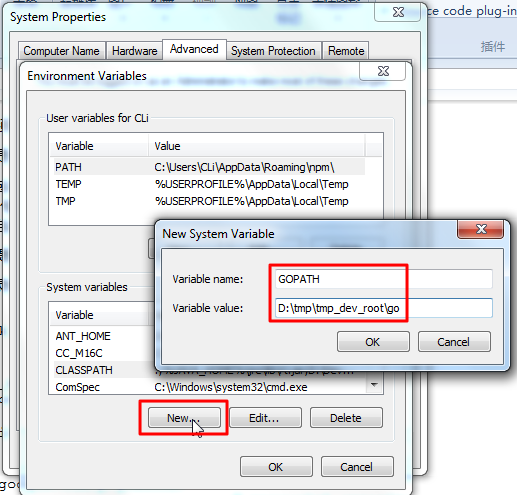
设置到此变量中:
GOPATH = D:\tmp\tmp_dev_root\go
如图:
再把
D:\tmp\tmp_dev_root\go\bin
也加到PATH中去。
7.开发自己的go语言的模块的话,要尽量避免名字和go语言系统内置的模块名所冲突。
8.安装提示,去建立好了文件夹和文件:
D:\tmp\tmp_dev_root\go\src\github.com\user\hello\hello.go
然后去:
go install github.com/user/hello
如图:
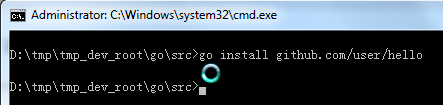
执行了,但是没有任何输出。
9.果然,安装了后,任何地方,都可以调用我的hello了:
D:\tmp\tmp_dev_root\go\src>go install github.com/user/hello

D:\tmp\tmp_dev_root\go\src>hello
hello, world

D:\tmp\tmp_dev_root\go\src>dir
 Volume in drive D has no label.
 Volume Serial Number is CECE-859F

 Directory of D:\tmp\tmp_dev_root\go\src

09/18/2013  10:34 AM    <DIR>          .
09/18/2013  10:34 AM    <DIR>          ..
09/18/2013  10:34 AM    <DIR>          github.com
               0 File(s)              0 bytes
               3 Dir(s)  139,561,541,632 bytes free

D:\tmp\tmp_dev_root\go\src>
10.然后,可以看到,bin下面有hello.exe:
D:\tmp\tmp_dev_root\go\src>dir
 Volume in drive D has no label.
 Volume Serial Number is CECE-859F

 Directory of D:\tmp\tmp_dev_root\go\src

09/18/2013  10:34 AM    <DIR>          .
09/18/2013  10:34 AM    <DIR>          ..
09/18/2013  10:34 AM    <DIR>          github.com
               0 File(s)              0 bytes
               3 Dir(s)  139,561,541,632 bytes free

D:\tmp\tmp_dev_root\go\src>cd github.com

D:\tmp\tmp_dev_root\go\src\github.com>cd user

D:\tmp\tmp_dev_root\go\src\github.com\user>cd hello

D:\tmp\tmp_dev_root\go\src\github.com\user\hello>dir
 Volume in drive D has no label.
 Volume Serial Number is CECE-859F

 Directory of D:\tmp\tmp_dev_root\go\src\github.com\user\hello

09/18/2013  10:34 AM    <DIR>          .
09/18/2013  10:34 AM    <DIR>          ..
09/18/2013  10:11 AM                82 hello.go
               1 File(s)             82 bytes
               2 Dir(s)  139,561,541,632 bytes free

D:\tmp\tmp_dev_root\go\src\github.com\user\hello>cd ../../../

D:\tmp\tmp_dev_root\go\src>dir
 Volume in drive D has no label.
 Volume Serial Number is CECE-859F

 Directory of D:\tmp\tmp_dev_root\go\src

09/18/2013  10:34 AM    <DIR>          .
09/18/2013  10:34 AM    <DIR>          ..
09/18/2013  10:34 AM    <DIR>          github.com
               0 File(s)              0 bytes
               3 Dir(s)  139,561,541,632 bytes free

D:\tmp\tmp_dev_root\go\src>cd ../bin

D:\tmp\tmp_dev_root\go\bin>dir
 Volume in drive D has no label.
 Volume Serial Number is CECE-859F

 Directory of D:\tmp\tmp_dev_root\go\bin

09/18/2013  10:36 AM    <DIR>          .
09/18/2013  10:36 AM    <DIR>          ..
09/18/2013  10:36 AM         1,558,016 hello.exe
               1 File(s)      1,558,016 bytes
               2 Dir(s)  139,561,541,632 bytes free

D:\tmp\tmp_dev_root\go\bin>cd ..

D:\tmp\tmp_dev_root\go>dir
 Volume in drive D has no label.
 Volume Serial Number is CECE-859F

 Directory of D:\tmp\tmp_dev_root\go

09/18/2013  10:29 AM    <DIR>          .
09/18/2013  10:29 AM    <DIR>          ..
09/18/2013  10:36 AM    <DIR>          bin
09/18/2013  10:29 AM    <DIR>          pkg
09/18/2013  10:34 AM    <DIR>          src
               0 File(s)              0 bytes
               5 Dir(s)  139,561,541,632 bytes free

D:\tmp\tmp_dev_root\go>cd pkg

D:\tmp\tmp_dev_root\go\pkg>dir
 Volume in drive D has no label.
 Volume Serial Number is CECE-859F

 Directory of D:\tmp\tmp_dev_root\go\pkg

09/18/2013  10:29 AM    <DIR>          .
09/18/2013  10:29 AM    <DIR>          ..
               0 File(s)              0 bytes
               2 Dir(s)  139,561,541,632 bytes free

D:\tmp\tmp_dev_root\go\pkg>
11.此处暂且不用git或svn去管理代码了。
所以,暂且不去理会那些提交代码的事情了。
12.不过,倒是可以继续参考教程,去建立我自己的crifanLib.go的库的:
D:\tmp\tmp_dev_root\go\pkg>pwd
/cygdrive/d/tmp/tmp_dev_root/go/pkg

D:\tmp\tmp_dev_root\go\pkg>cd ../src/

D:\tmp\tmp_dev_root\go\src>cd github.com

D:\tmp\tmp_dev_root\go\src\github.com>cd user

D:\tmp\tmp_dev_root\go\src\github.com\user>mkdir crifanLib

D:\tmp\tmp_dev_root\go\src\github.com\user>cd crifanLib

D:\tmp\tmp_dev_root\go\src\github.com\user\crifanLib>ls

D:\tmp\tmp_dev_root\go\src\github.com\user\crifanLib>dir
 Volume in drive D has no label.
 Volume Serial Number is CECE-859F

 Directory of D:\tmp\tmp_dev_root\go\src\github.com\user\crifanLib

09/18/2013  10:42 AM    <DIR>          .
09/18/2013  10:42 AM    <DIR>          ..
               0 File(s)              0 bytes
               2 Dir(s)  139,561,541,632 bytes free

D:\tmp\tmp_dev_root\go\src\github.com\user\crifanLib>
再去建立文件:
D:\tmp\tmp_dev_root\go\src\github.com\user\crifanLib>ls
crifanLib.go

D:\tmp\tmp_dev_root\go\src\github.com\user\crifanLib>ls -lha
ls: invalid option -- h
Try `ls --help' for more information.

D:\tmp\tmp_dev_root\go\src\github.com\user\crifanLib>ls -la
total 1
drwxr-xr-x   2 CLi      Administ        0 Sep 18 10:43 .
drwxr-xr-x   4 CLi      Administ        0 Sep 18 10:42 ..
-rw-r--r--   1 CLi      Administ       82 Sep 18 10:11 crifanLib.go

D:\tmp\tmp_dev_root\go\src\github.com\user\crifanLib>
13.然后,就是继续去编写库函数了。尤其是网络相关的。
但是算了,还是先从最基本的,把所有代码都放在单个文件:EmulateLoginBaidu.go中吧:
D:\tmp\tmp_dev_root\go\src\github.com\user\EmulateLoginBaidu\EmulateLoginBaidu.go
然后,就是去编译确定是可以工作的:
D:\tmp\tmp_dev_root\go\src\github.com\user>cd EmulateLoginBaidu

D:\tmp\tmp_dev_root\go\src\github.com\user\EmulateLoginBaidu>ls
EmulateLoginBaidu.go      EmulateLoginBaidu.go.bak

D:\tmp\tmp_dev_root\go\src\github.com\user\EmulateLoginBaidu>go install EmulateLoginBaidu.go
go install: no install location for directory D:\tmp\tmp_dev_root\go\src\github.com\user\EmulateLoginBaidu outside GOPATH

D:\tmp\tmp_dev_root\go\src\github.com\user\EmulateLoginBaidu>cd ../../../

D:\tmp\tmp_dev_root\go\src>go install github.com/user/EmulateLoginBaidu

D:\tmp\tmp_dev_root\go\src>EmulateLoginBaidu
this is EmulateLoginBaidu.go

D:\tmp\tmp_dev_root\go\src>
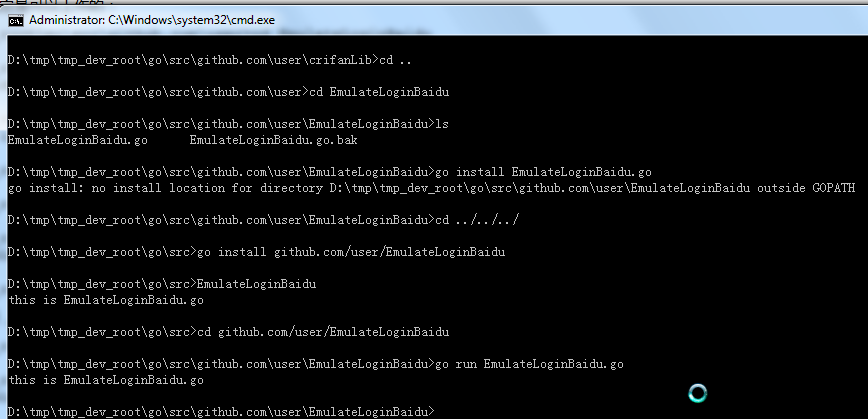
不去编译,直接运行,也是可以的:
D:\tmp\tmp_dev_root\go\src>cd github.com/user/EmulateLoginBaidu

D:\tmp\tmp_dev_root\go\src\github.com\user\EmulateLoginBaidu>go run EmulateLoginBaidu.go
this is EmulateLoginBaidu.go

D:\tmp\tmp_dev_root\go\src\github.com\user\EmulateLoginBaidu>
如图:
【总结】
好了,基本的go的目录结构搞好了,余下的,就是去一点点学习对应的模块,去写代码了。
转载请注明:在路上 » 【记录】学习如何写go语言代码