Mac中用git时,经常会遇到:需要去忽略掉.DS_Store
之前是每个项目中自动加上
现在希望是:
可以写个配置:
忽略当前目录及子目录中的.DS_Store
或者git全局去忽略
gitignore ds_store
macos – How can I Remove .DS_Store files from a Git repository? – Stack Overflow
.gitignore all the .DS_Store files in every folder and subfolder – Stack Overflow
macos – How can I Remove .DS_Store files from a Git repository? – Stack Overflow
貌似.gitignore中加上:
<code>.DS_Store
</code>
即可实现:
当前目录及子目录都可以忽略掉.DS_Store了?
git omit .DS_Store current folder and subfolders
Using .gitignore the Right Way – ConSol Labs
.gitignore entry | Ignores every… |
target/ | …folder (due to the trailing /) recursively |
target | …file or folder named target recursively |
/target | …file or folder named target in the top-most directory (due to the leading /) |
/target/ | …folder named target in the top-most directory (leading and trailing /) |
*.class | …every file or folder ending with .class recursively |
看起来是的。
所以去加上:
.DS_Store
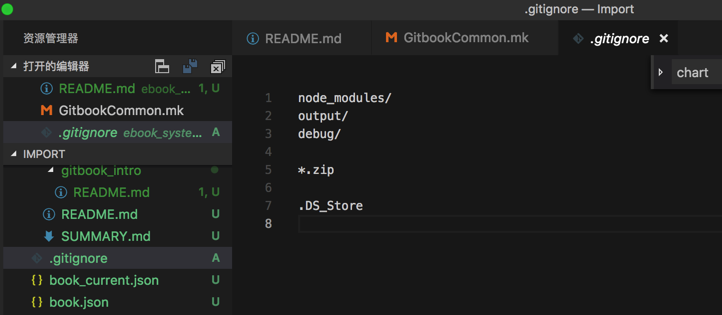
即可。
转载请注明:在路上 » 【已解决】Mac中git忽略当前目录及子目录的.DS_Store