折腾:
后,虽然可以打开:
在界面上把status改为DEBUG或RUN去运行,但是有些爬虫要爬完所有内容需要很长时间,比如此处:但是界面上调试运行,跑了好多个小时,还没结束,所以先去暂停了:
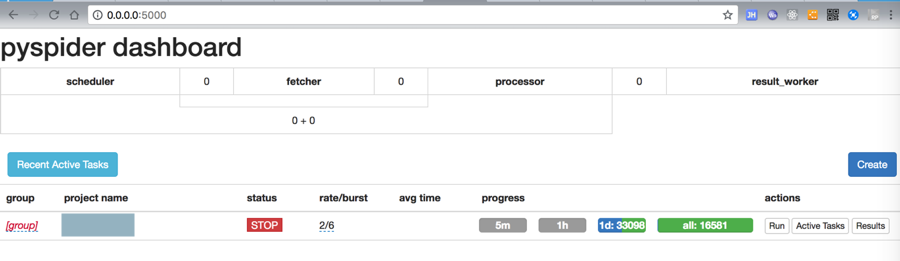
另外,还有个因素是:
此处在运行此Pyspider的项目同时,要去调试另外一个PySpider项目
-》所以除了打算更换默认的5000端口之外,最好让之前的PySpider项目在命令行的后台运行,不要影响此处将要调试的新项目。
去找找:如何直接运行,而不是界面上调试选择DEBUG或RUN的运行。
感觉就是属于:Pyspider的部署方面的问题了
部署 – pyspider中文文档 – pyspider中文网
没看懂如何命令行直接运行
pyspider 命令行 运行 部署
pyspider command line run not ui
Interact with pyspider via other program / command line – Google Groups
<code>➜  xxx git:(master) ✗ pyspider --help
Usage: pyspider [OPTIONS] COMMAND [ARGS]...

  A powerful spider system in python.

Options:
  -c, --config FILENAME           a json file with default values for
                                  subcommands. {"webui": {"port":5001}}
  --logging-config TEXT           logging config file for built-in python
                                  logging module  [default: /Users/crifan/.loc
                                  al/share/virtualenvs/crawler_qupeiyin_child-
                                  SW6GVzwk/lib/python3.6/site-
                                  packages/pyspider/logging.conf]
  --debug                         debug mode
  --queue-maxsize INTEGER         maxsize of queue
  --taskdb TEXT                   database url for taskdb, default: sqlite
  --projectdb TEXT                database url for projectdb, default: sqlite
  --resultdb TEXT                 database url for resultdb, default: sqlite
  --message-queue TEXT            connection url to message queue, default:
                                  builtin multiprocessing.Queue
  --amqp-url TEXT                 [deprecated] amqp url for rabbitmq. please
                                  use --message-queue instead.
  --beanstalk TEXT                [deprecated] beanstalk config for beanstalk
                                  queue. please use --message-queue instead.
  --phantomjs-proxy TEXT          phantomjs proxy ip:port
  --data-path TEXT                data dir path
  --add-sys-path / --not-add-sys-path
                                  add current working directory to python lib
                                  search path
  --version                       Show the version and exit.
  --help                          Show this message and exit.

Commands:
  all            Run all the components in subprocess or...
  bench          Run Benchmark test.
  fetcher        Run Fetcher.
  one            One mode not only means all-in-one, it runs...
  phantomjs      Run phantomjs fetcher if phantomjs is...
  processor      Run Processor.
  result_worker  Run result worker.
  scheduler      Run Scheduler, only one scheduler is allowed.
  send_message   Send Message to project from command line
  webui          Run WebUI
</code>
pyspider run in command line
算了,直接试试
<code>➜  xxx git:(master) ✗ pyspider all
phantomjs fetcher running on port 25555
[I 180713 09:15:21 result_worker:49] result_worker starting...
[I 180713 09:15:22 tornado_fetcher:638] fetcher starting...
[I 180713 09:15:22 processor:211] processor starting...
[I 180713 09:15:22 scheduler:647] scheduler starting...
[I 180713 09:15:22 scheduler:126] project xxx updated, status:STOP, paused:False, 0 tasks
[I 180713 09:15:22 scheduler:782] scheduler.xmlrpc listening on 127.0.0.1:23333
[I 180713 09:15:22 scheduler:586] in 5m: new:0,success:0,retry:0,failed:0
[I 180713 09:15:22 app:76] webui running on 0.0.0.0:5000

</code>
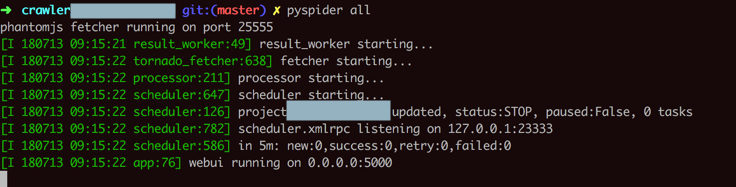
没用,和之前一样,没有自动启动运行
pyspider 启动
感觉问题就转换为了:
如何开始运行PySpider项目
也还是在界面上切换status才能开始启动爬取
(新手向)教你如何搭建简易pyspider服务器 – CSDN博客
pyspider 如何开始爬取
pyspider how start run
Pyspider框架 —— Python爬虫实战之爬取 V2EX 网站帖子
Python 爬虫 – pyspider 框架的使用 – 后端 – 掘金
“Start Running
1. Save your script.
2. Back to dashboard find your project.
3. Changing the status to DEBUG or RUNNING.
4. Click the run button.”
貌似只能在webui中更改status为DEBUG或RUNNING,再点击RUN才能开始爬取??
pyspider 点击run之后没有反应 – SegmentFault 思否
【总结】
貌似PySpider的触发开始真正去爬取的方式,只能通过WebUI界面中
更改status为DEBUG或RUNNING,再点击RUN
才能开始爬取
没法直接在命令行或者别的什么方式去触发爬取。
注:官网文档中介绍的部署,只是参数设置方面的部署,而非直接触发运行的方式。
那接下来,只能去试试:
转载请注明:在路上 » 【无法解决】PySpider的部署运行而非调试界面上RUN运行