折腾:
【未解决】自己写Python脚本同步印象笔记到WordPress
期间,先去研究,怎么用Python把印象笔记中的内容,发布到自己的WordPress网站crifan.com中。
先去研究:
【已解决】用Python发布帖子到WordPress用什么库和调用哪些接口
不过在此期间,还是先去处理:
【已解决】用Python处理印象笔记帖子:缩放图片并保存回印象笔记
和期间的:
【已解决】Python中更新印象笔记中帖子中附件图片的数据
和:
【已解决】Python更新印象笔记note帖子的内容
现在整个HTML都处理好了,然后继续:
【已解决】用Python通过WordPress的REST的API发布文章post
然后还剩下一些其他代码逻辑优化
包括:tags,category等内容
从获取印象笔记获取相关信息,生成对应的标签列表tags和分类
不过在此之前,先去优化现在代码逻辑:
把之前的函数,改为Class类的实现
把Evernote和WordPress分别独立到各自的类中
期间遇到:
【已解决】Python中class的staticmethod中bool参数本身值是False但传入却是True
目前先优化为:
libs/crifan/Evernote.py
# Update: 20200317
# Author: Crifan Li

import logging
import sys

sys.path.append("lib")
sys.path.append("libs/evernote-sdk-python3/lib")

from libs.crifan import utils

# import evernote.edam.userstore.constants as UserStoreConstants
# import evernote.edam.noteStore as NoteStore
# import evernote.edam.type.ttypes as Types
# from evernote.api.client import EvernoteClient

# from evernote.edam import *
from evernote import *
from evernote.api import *
from evernote.api.client import *
from evernote.edam.limits import *
from evernote.edam.type import *
import evernote.edam.type.ttypes as Types
from evernote.edam.type.ttypes import *
from evernote.edam.notestore import *
from evernote.edam.notestore.ttypes import *
from evernote.edam.notestore.NoteStore import *
from evernote.edam.userstore import *
from evernote.edam.userstore.constants import *

class Evernote(object):
  """
    Operate Evernote Yinxiang note via python

      首页
      http://sandbox.yinxiang.com

      登录
      https://sandbox.yinxiang.com/Login.action?offer=www_menu

      Web版 主页
      https://sandbox.yinxiang.com/Home.action?_sourcePage=q4oOUtrE7iDiMUD9T65RG_YvRLZ-1eYO3fqfqRu0fynRL_1nukNa4gH1t86pc1SP&__fp=RRdnsZFJxJY3yWPvuidLz-TPR6I9Jhx8&hpts=1576292029828&showSwitchService=true&usernameImmutable=false&login=&login=登录&login=true&username=green-waste%40163.com&hptsh=10h%2BVHVzIGiSBhmRcxjMg47ZqdQ%3D#n=5b863474-107d-43e0-8087-b566329b24ab&s=s1&ses=4&sh=2&sds=5&

      获取token
      https://sandbox.yinxiang.com/api/DeveloperToken.action
      ->
      NoteStore URL: https://sandbox.yinxiang.com/shard/s1/notestore
  """

  def __init__(self, authToken, isSandbox=False, isChina=True):
    self.authToken = authToken
    self.isSandbox = isSandbox
    self.isChina = isChina
    # logging.debug("self.isSandbox=%s, self.isChina=%s", self.isSandbox, self.isChina)
    self.host = Evernote.getHost(self.isSandbox, self.isChina)

    self.client = self.initClient()
    logging.info("self.client=%s", self.client)

    self.userStore = self.client.get_user_store()
    logging.info("self.userStore=%s", self.userStore)

    self.isSdkLatest = self.userStore.checkVersion(
        "Evernote EDAMTest (Python)",
        EDAM_VERSION_MAJOR, # UserStoreConstants.EDAM_VERSION_MAJOR,
        EDAM_VERSION_MINOR, # UserStoreConstants.EDAM_VERSION_MINOR
    )
    if self.isSdkLatest:
      logging.info("Evernote API version is latest")
    else:
      logging.warning("Evernote API version is NOT latest -> need update")

    self.noteStore = self.client.get_note_store()
    logging.info("self.noteStore=%s", self.noteStore)

  @staticmethod
  def getHost(isSandbox=False, isChina=True):
    # logging.debug("isSandbox=%s, isChina=%s", isSandbox, isChina)
    evernoteHost = ""
    if isChina:
        if isSandbox:
            evernoteHost = "sandbox.yinxiang.com"
        else:
            evernoteHost = "app.yinxiang.com"
    else:
        if isSandbox:
            evernoteHost = "sandbox.evernote.com"
        else:
            evernoteHost = "app.evernote.com"

    return evernoteHost

  @staticmethod
  def isImageResource(curResource):
      """check is image media or not


      Args:
          curMedia (Resource): Evernote Resouce instance
      Returns:
          bool
      Raises:
      """
      isImage = False
      curResMime = curResource.mime # 'image/png' 'image/jpeg'
      # libs/evernote-sdk-python3/lib/evernote/edam/limits/constants.py
      matchImage = re.match("^image/", curResMime)
      logging.debug("matchImage=%s", matchImage)
      if matchImage:
          """
              image/gif
              image/jpeg
              image/png
          """
          isImage = True
      logging.info("curResMime=%s -> isImage=%s", curResMime, isImage)
      return isImage

  def initClient(self):
    client = EvernoteClient(
      token=self.authToken,
      # sandbox=self.isSandbox,
      # china=self.isChina,
      service_host=self.host
    )
    return client

  def listNotebooks(self):
    notebookList = self.noteStore.listNotebooks()
    return notebookList


  def findNotes(self, notebookId):
      """Process each note"""
      logging.info("notebookId=%s", notebookId)
      # find all notes in notebook
      searchOffset = 0
      searchPageSize = 1000
      searchFilter = NoteStore.NoteFilter()
      searchFilter.order = NoteSortOrder.UPDATED
      searchFilter.ascending = False
      searchFilter.notebookGuid = notebookId
      logging.info("searchFilter=%s", searchFilter)
      resultSpec = NotesMetadataResultSpec()
      resultSpec.includeTitle = True
      resultSpec.includeContentLength = True
      resultSpec.includeCreated = True
      resultSpec.includeUpdated = True
      resultSpec.includeDeleted = True
      resultSpec.includeNotebookGuid = True
      resultSpec.includeTagGuids = True
      resultSpec.includeAttributes = True
      resultSpec.includeLargestResourceMime = True
      resultSpec.includeLargestResourceSize = True
      logging.info("resultSpec=%s", resultSpec)


      # foundNoteResult = self.noteStore.findNotesMetadata(
      #     authenticationToken=self.authToken,
      #     filter=searchFilter,
      #     offset=searchOffset,
      #     maxNotes=pageSize,
      #     resultSpec=resultSpec
      # )
      foundNoteResult = self.noteStore.findNotesMetadata(
        self.authToken, searchFilter, searchOffset, searchPageSize, resultSpec)
      logging.info("foundNoteResult=%s", foundNoteResult)
      totalNotes = foundNoteResult.totalNotes
      logging.info("totalNotes=%s", totalNotes)
      foundNoteList = foundNoteResult.notes
      return foundNoteList


  def getNoteDetail(self, noteId):
      """get note detail


      Args:
          noteId (str): Evernote note id
      Returns:
          Note with detail
      Raises:
      Examples:
          '9bf6cecf-d91e-4391-a034-199c744424db'
      """
      # noteDetail = self.noteStore.getNote(self.authToken, noteId, True, True, True, True)
      # noteDetail = self.noteStore.getNote(
      #     authenticationToken=self.authToken,
      #     guid=noteId,
      #     withContent=True,
      #     withResourcesData=True,
      #     # withResourcesRecognition=True,
      #     withResourcesRecognition=False,
      #     # withResourcesAlternateData=True,
      #     withResourcesAlternateData=False,
      # )
      noteDetail = self.noteStore.getNote(self.authToken, noteId, True, True, False, False)
      return noteDetail

def resizeNoteImage(self, noteDetail, isSync=False):
    """Resize note each media image and update note content, and sync to evernote if necessary


    Args:
        noteDetail (Note): evernote note
        isSync (bool): whether to sync to evernote
    Returns:
        updated note
    Raises:
    """
    newResList = []
    originResList = noteDetail.resources
    for curIdx, eachResource in enumerate(originResList):
        if Evernote.isImageResource(eachResource):
            imgFilename = eachResource.attributes.fileName
            logging.info("[%d] imgFilename=%s", curIdx, imgFilename)


            resBytes = eachResource.data.body
            resizedImgBytes, imgFormat = utils.resizeSingleImage(resBytes)


            reizedImgLen = len(resizedImgBytes) # 77935
            resizedImgMd5Bytes = utils.calcMd5(resizedImgBytes, isRespBytes=True) # '3110e1e7994dc119ff92439c5758e465'
            newMime = utils.ImageFormatToMime[imgFormat] # 'image/jpeg'


            newData = Types.Data()
            # newData = ttypes.Data()
            newData.size = reizedImgLen
            newData.bodyHash = resizedImgMd5Bytes
            newData.body = resizedImgBytes


            newRes = Types.Resource()
            # newRes = ttypes.Resource()
            newRes.mime = newMime
            newRes.data = newData
            newRes.attributes = eachResource.attributes


            newResList.append(newRes)
        else:
            """
                audio/wav
                audio/mpeg
                audio/amr
                application/pdf
                ...
            """
            newResList.append(eachResource)


    noteDetail = updateNoteResouces(noteDetail, newResList)


    return noteDetail
后续继续优化。
此处继续,目的优先是把贴子内容,真实的发布到crifan.com上为准。
然后再逐步优化细节和添加功能。
先去调试看看
发现Python环境需要准备好:
pip install bs4
pip install oauth2
不过发现此处有
Pipfile
所以去尝试恢复环境
pipenv install
不过后来发现,python 3.7和3.8等都混淆了
所以去删除本地pipenv的虚拟环境
重建虚拟环境
最后才可以开始正常调试
然后遇到:
【已解决】Evernote同步出错:Exception has occurred AttributeError Store object has no attribute syncNote
此处测试期间,发现图片是被从 png 压缩更新为 jpeg了
然后update同步更新后,再去看帖子内容
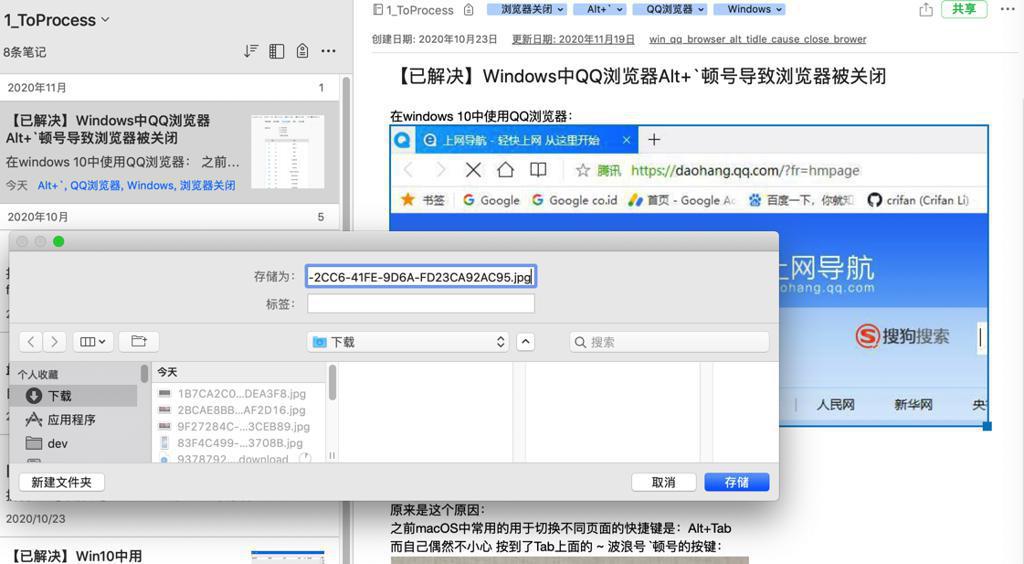
果然是 图片已经更新为 jpg了
说明updateNote
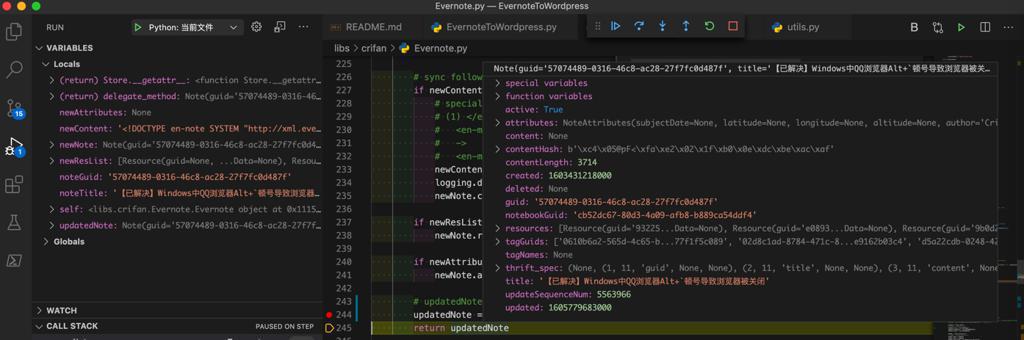
成功更新内容了
继续调试,尽快让帖子内容可以同步上传到WordPress中。
然后去优化和更新图片上传逻辑:
【已解决】用Python把Evernote的note中图片上传到Wordpress中并更新Note笔记
【总结】
此处把可以把Evernote中的note笔记,发布到wordpress网站crifan.com的相关代码贴出来:
EvernoteToWordpress.py
def uploadNoteToWordpress(curNote):
    """Upload note content new html to wordpress


    Args:
        curNote (Note): evernote Note
    Returns:
        (bool, dict)
    Raises:
    """
    # created=1582809109000, updated=1584190363000,
    # dateTimestampInt = curNote.updated
    dateTimestampInt = curNote.created # 1582809109000
    dateTimestampFloat = float(dateTimestampInt) / 1000.0 # 1582809109.0
    datetimeObj = utils.timestampToDatetime(dateTimestampFloat)
    outputFormat = "%Y-%m-%dT%H:%M:%S"
    dateStr = datetimeObj.strftime(format=outputFormat) # '2020-02-27T21:11:49'


    isUploadOk, respInfo = gWordpress.createPost(
        title=curNote.title,
        content=curNote.content,
        dateStr=dateStr,
        slug=curNote.attributes.sourceURL,
    )
    logging.info("isUploadOk=%s, respInfo=%s", isUploadOk, respInfo)
    return isUploadOk, respInfo
libs/crifan/crifanWordpress.py
    def createPost(self,
            title,
            content,
            dateStr,
            slug,
            status="draft",
            postFormat="standard"
        ):
        """Create wordpress standard post
            by call REST api: POST /wp-json/wp/v2/posts


        Args:
            title (str): post title
            content (str): post content of html
            dateStr (str): date string
            slug (str): post slug url
            status (str): status, default to 'draft'
            postFormat (str): post format, default to 'standard'
        Returns:
            (bool, dict)
                True, uploaded post info
                False, error detail
        Raises:
        """
        curHeaders = {
            "Authorization": self.authorization,
            "Content-Type": "application/json",
            "Accept": "application/json",
        }
        logging.info("curHeaders=%s", curHeaders)
        postDict = {
            "title": title,
            "content": content,
            # "date_gmt": dateStr,
            "date": dateStr,
            "slug": slug,
            "status": status,
            "format": postFormat,
            # TODO: featured_media, categories, tags, excerpt
        }
        logging.debug("postDict=%s", postDict)
        # postDict={'title': '【已解决】Mac中给pip更换源以加速下载', 'content': '<div>\n  折腾:\n </div>。。。。。。。。。</div>\n', 'date': '20200227T211149', 'slug': 'mac_pip_change_source_server_to_spped_up_download', 'status': 'draft', 'format': 'standard'}
        createPostUrl = self.apiPosts
        resp = requests.post(
            createPostUrl,
            proxies=self.requestsProxies,
            headers=curHeaders,
            # data=json.dumps(postDict),
            json=postDict, # internal auto do json.dumps
        )
        logging.info("resp=%s", resp)


        isUploadOk, respInfo = crifanWordpress.processCreateResponse(resp)
        return isUploadOk, respInfo

    @staticmethod
    def processCreateResponse(resp):
        """Process common wordpress POST response for
            /wp-json/wp/v2/media
            /wp-json/wp/v2/posts


        Args:
            resp (Response): requests response
        Returns:
            (bool, dict)
                True, created item info
                False, error detail
        Raises:
        """
        isCreateOk, respInfo = False, {}


        if resp.ok:
            respJson = resp.json()
            logging.info("respJson=%s", respJson)
            """
            for /wp-json/wp/v2/media
                {
                    "id": 70401,
                    "date": "2020-03-13T22:34:29",
                    "date_gmt": "2020-03-13T14:34:29",
                    "guid": {
                        "rendered": "https://www.crifan.com/files/pic/uploads/2020/03/f6956c30ef0b475fa2b99c2f49622e35.png",
                        "raw": "https://www.crifan.com/files/pic/uploads/2020/03/f6956c30ef0b475fa2b99c2f49622e35.png"
                    },
                    "modified": "2020-03-13T22:34:29",
                    ...
                    "slug": "f6956c30ef0b475fa2b99c2f49622e35",
                    "status": "inherit",
                    "type": "attachment",
                    "link": "https://www.crifan.com/f6956c30ef0b475fa2b99c2f49622e35/",
                    "title": {
                        "raw": "f6956c30ef0b475fa2b99c2f49622e35",
                        "rendered": "f6956c30ef0b475fa2b99c2f49622e35"
                    },

            for /wp-json/wp/v2/posts
                {
                    "id": 70410,
                    "date": "2020-02-27T21:11:49",
                    "date_gmt": "2020-02-27T13:11:49",
                    "guid": {
                        "rendered": "https://www.crifan.com/?p=70410",
                        "raw": "https://www.crifan.com/?p=70410"
                    },
                    "modified": "2020-02-27T21:11:49",
                    "modified_gmt": "2020-02-27T13:11:49",
                    "password": "",
                    "slug": "mac_pip_change_source_server_to_spped_up_download",
                    "status": "draft",
                    "type": "post",
                    "link": "https://www.crifan.com/?p=70410",
                    "title": {
                        'raw": "【已解决】Mac中给pip更换源以加速下载",
                        "rendered": "【已解决】Mac中给pip更换源以加速下载"
                    },
                    "content": {
                        ...


            """
            newId = respJson["id"]
            newUrl = respJson["guid"]["rendered"]
            newSlug = respJson["slug"]
            newLink = respJson["link"]
            newTitle = respJson["title"]["rendered"]
            logging.info("newId=%s, newUrl=%s, newSlug=%s, newLink=%s, newTitle=%s", newId, newUrl, newSlug, newLink, newTitle)
            isCreateOk = True
            respInfo = {
                "id": newId, # 70393
                "url": newUrl, # https://www.crifan.com/files/pic/uploads/2020/03/f6956c30ef0b475fa2b99c2f49622e35.png
                "slug": newSlug, # f6956c30ef0b475fa2b99c2f49622e35
                "link": newLink, # https://www.crifan.com/f6956c30ef0b475fa2b99c2f49622e35/
                "title": newTitle, # f6956c30ef0b475fa2b99c2f49622e35
            }
        else:
            isCreateOk = False
            # respInfo = resp.status_code, resp.text
            respInfo = {
                "errCode": resp.status_code,
                "errMsg": resp.text,
            }


        logging.info("isCreateOk=%s, respInfo=%s", isCreateOk, respInfo)
        return isCreateOk, respInfo
供参考。
最新和完整代码详见:
- crifanWordpress.py
- crifanEvernoteToWordpress.py
- crifanEvernote.py
【后记20201205】
先去确认:
【记录】Python发布帖子到WordPress后确认内容无误
再去继续加新功能:
【已解决】给Python发布印象笔记帖子内容到WordPress文章时加上分类和标签
【后记20210103】
已回复帖子