见到Preact中的html模板中有写到:
<meta name=”theme-color” content=”#673ab8”>
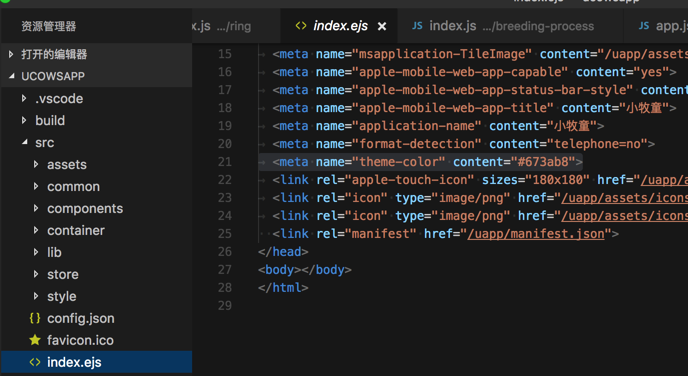
想要搞清楚其含义。
去搜:
meta theme-color
图标和浏览器颜色 | Web | Google Developers
Support for theme-color in Chrome 39 for Android | Web | Google Developers
[Tutorial] Adding a theme-color to browser toolbar (Chrome for Android only) – YOOtheme
【总结】
“当用户访问您的网页时,浏览器会尝试从 HTML 提取图标。图标可能出现在许多地方,包括浏览器标签、最近的应用切换、新的(或最近访问的)标签页面等。”
-》而Android手机中浏览器Chrome,就支持这类功能。
-》允许你在html中定义对应的:
theme-color:主题颜色
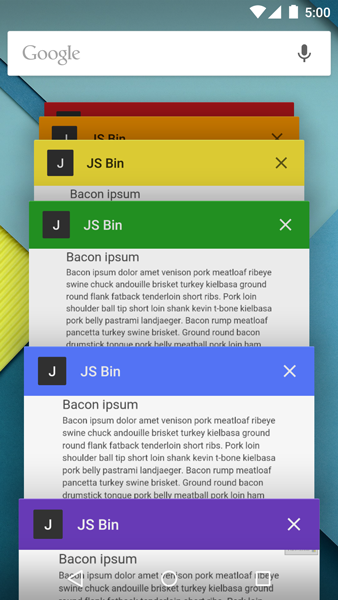
等等,可以实现,顶栏header bar和地址栏address bar的多彩的颜色
效果类似于这种:
注:
另外类似的,也支持定义
icon:图标
用于不同浏览器。
对应的是:
Chrome:
<!– icon in the highest resolution we need it for –> <link rel=”icon” sizes=”192×192″ href=”icon.png”> <!– reuse same icon for Safari –> <link rel=”apple-touch-icon” href=”ios-icon.png”> <!– multiple icons for IE –> <meta name=”msapplication-square310x310logo” content=”icon_largetile.png”> |
Safari:
<link rel=”apple-touch-icon” href=”touch-icon-iphone.png”> <link rel=”apple-touch-icon” sizes=”76×76″ href=”touch-icon-ipad.png”> <link rel=”apple-touch-icon” sizes=”120×120″ href=”touch-icon-iphone-retina.png”> <link rel=”apple-touch-icon” sizes=”152×152″ href=”touch-icon-ipad-retina.png”> |
IE 和 Windows Phone
<meta name=”msapplication-square70x70logo” content=”icon_smalltile.png”> <meta name=”msapplication-square150x150logo” content=”icon_mediumtile.png”> <meta name=”msapplication-wide310x150logo” content=”icon_widetile.png”> |
【总结】
此处,对于theme color,去设置为:
<!– Theme Color –> <!– Chrome, Firefox OS and Opera –> <meta name=”theme-color” content=”#673ab8″> <!– Windows Phone –> <meta name=”msapplication-navbutton-color” content=”#673ab8″> <!– iOS Safari –> <meta name=”apple-mobile-web-app-status-bar-style” content=”#673ab8″> |
待后续看看效果。
【后记】
【整理】web的app中的manifest.json的作用和参数含义
转载请注明:在路上 » 【整理】HTML中meta theme-color的含义