背景
Python中,想要打开已经存在的excel的xls文件,然后在最后新的一行的数据。
折腾过程
1.找到了参考资料:
writing to existing workbook using xlwt
其实是没有直接实现:
打开已有的excel文件,然后在文件最后写入,添加新数据
的函数的。
只不过,可以利用:
Working with Excel Files in Python
中的库,组合实现。
2. writing to existing workbook using xlwt
给出了示例代码:
rom xlutils.copy import copy # http://pypi.python.org/pypi/xlutils
from xlrd import open_workbook # http://pypi.python.org/pypi/xlrd
from xlwt import easyxf # http://pypi.python.org/pypi/xlwt

START_ROW = 297 # 0 based (subtract 1 from excel row number)
col_age_november = 1
col_summer1 = 2
col_fall1 = 3

rb = open_workbook(file_path,formatting_info=True)
r_sheet = rb.sheet_by_index(0) # read only copy to introspect the file
wb = copy(rb) # a writable copy (I can't read values out of this, only write to it)
w_sheet = wb.get_sheet(0) # the sheet to write to within the writable copy

for row_index in range(START_ROW, r_sheet.nrows):
    age_nov = r_sheet.cell(row_index, col_age_november).value
    if age_nov == 3:
        #If 3, then Combo I 3-4 year old  for both summer1 and fall1
        w_sheet.write(row_index, col_summer1, 'Combo I 3-4 year old')
        w_sheet.write(row_index, col_fall1, 'Combo I 3-4 year old')

wb.save(file_path + '.out' + os.path.splitext(file_path)[-1])
3. 刚又看到,有更简洁的代码:
from xlutils.copy import copy
w = copy('book1.xls')
w.get_sheet(0).write(0,0,"foo")
w.save('book2.xls')
4.现在打算去试试。
先去安装xlrd:
6.再去安装xlutils:
【记录】Python中安装可以读写excel的xls文件的xlutils模块(需依赖于xlrd和xlwt)
7.接着可以去写代码了。
8.先是:
【已解决】Python中使用xlutils.copy出错:AttributeError: ‘module’ object has no attribute ‘copy’
9.后是:
【已解决】Python中使用xlutils的copy出错:AttributeError: ‘str’ object has no attribute ‘datemode’
10.后来是用如下代码:
import xlwt;
import xlrd;
#import xlutils;
from xlutils.copy import copy;

#init xls file
#styleBlueBkg= xlwt.easyxf('pattern: pattern solid, fore_colour sky_blue;');
#styleBold   = xlwt.easyxf('font: bold on');
styleBoldRed   = xlwt.easyxf('font: color-index red, bold on');
headerStyle = styleBoldRed;
wb = xlwt.Workbook();
ws = wb.add_sheet(gConst['xls']['sheetName']);
ws.write(0, 0, "Header",        headerStyle);
ws.write(0, 1, "CatalogNumber", headerStyle);
ws.write(0, 2, "PartNumber",    headerStyle);
wb.save(gConst['xls']['fileName']);


#open existed xls file
#newWb = xlutils.copy(gConst['xls']['fileName']);
#newWb = copy(gConst['xls']['fileName']);
oldWb = xlrd.open_workbook(gConst['xls']['fileName']);
print oldWb; #<xlrd.book.Book object at 0x000000000315C940>
newWb = copy(oldWb);
print newWb; #<xlwt.Workbook.Workbook object at 0x000000000315F470>
newWs = newWb.get_sheet(0);
newWs.write(1, 0, "value1");
newWs.write(1, 1, "value2");
newWs.write(1, 2, "value3");
print "write new values ok";
newWb.save(gConst['xls']['fileName']);
print "save with same name ok";
实现了,打开,刚刚保存的,已经存在的xls文件,
然后写入新数据的目的。
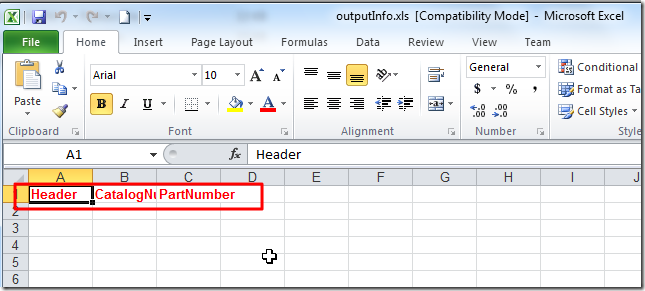
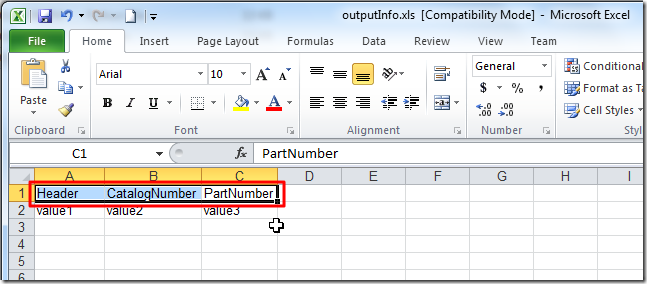
但是有个缺点,
第一次保存时的,带格式(标题内容为红色粗体)的内容:
重新写入新数据,再保存时,却丢失了之前的格式(标题没了红色粗体了):
11.后来还是参考:
writing to existing workbook using xlwt
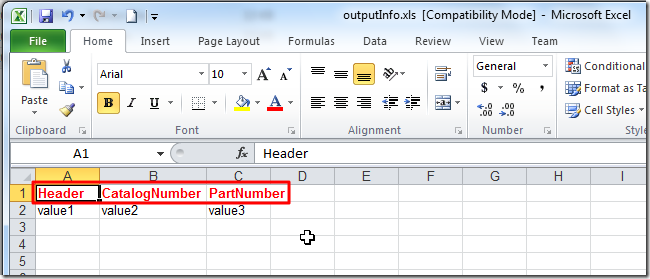
中的那个标准答案,在用xlrd.open_workbook时,添加对应的参数formatting_info=True,就可以保留原有格式了。
完整代码:
import xlwt;
import xlrd;
#import xlutils;
from xlutils.copy import copy;

#init xls file
#styleBlueBkg= xlwt.easyxf('pattern: pattern solid, fore_colour sky_blue;');
#styleBold   = xlwt.easyxf('font: bold on');
styleBoldRed   = xlwt.easyxf('font: color-index red, bold on');
headerStyle = styleBoldRed;
wb = xlwt.Workbook();
ws = wb.add_sheet(gConst['xls']['sheetName']);
ws.write(0, 0, "Header",        headerStyle);
ws.write(0, 1, "CatalogNumber", headerStyle);
ws.write(0, 2, "PartNumber",    headerStyle);
wb.save(gConst['xls']['fileName']);


#open existed xls file
#newWb = xlutils.copy(gConst['xls']['fileName']);
#newWb = copy(gConst['xls']['fileName']);
oldWb = xlrd.open_workbook(gConst['xls']['fileName'], formatting_info=True);
print oldWb; #<xlrd.book.Book object at 0x000000000315C940>
newWb = copy(oldWb);
print newWb; #<xlwt.Workbook.Workbook object at 0x000000000315F470>
newWs = newWb.get_sheet(0);
newWs.write(1, 0, "value1");
newWs.write(1, 1, "value2");
newWs.write(1, 2, "value3");
print "write new values ok";
newWb.save(gConst['xls']['fileName']);
print "save with same name ok";
最后重新写入的数据,就可以保留之前的格式了(标题为红色粗体):
总结
python中操作,本身就复杂的xls文件,还是有点小麻烦的。
想要,往已经存在的xls文件中,写入新的行,新的数据,对应的逻辑为:
- 用xlrd.open_workbook打开已有的xsl文件
- 注意添加参数formatting_info=True,得以保存之前数据的格式
- 然后用,from xlutils.copy import copy;,之后的copy去从打开的xlrd的Book变量中,拷贝出一份,成为新的xlwt的Workbook变量
- 然后对于xlwt的Workbook变量,就是正常的:
- 通过get_sheet去获得对应的sheet
- 拿到sheet变量后,就可以往sheet中,写入新的数据
- 写完新数据后,最终save保存
相关完整代码为:
import xlwt;
import xlrd;
#import xlutils;
from xlutils.copy import copy;

styleBoldRed   = xlwt.easyxf('font: color-index red, bold on');
headerStyle = styleBoldRed;
wb = xlwt.Workbook();
ws = wb.add_sheet(gConst['xls']['sheetName']);
ws.write(0, 0, "Header",        headerStyle);
ws.write(0, 1, "CatalogNumber", headerStyle);
ws.write(0, 2, "PartNumber",    headerStyle);
wb.save(gConst['xls']['fileName']);

#open existed xls file
#newWb = xlutils.copy(gConst['xls']['fileName']);
#newWb = copy(gConst['xls']['fileName']);
oldWb = xlrd.open_workbook(gConst['xls']['fileName'], formatting_info=True);
print oldWb; #<xlrd.book.Book object at 0x000000000315C940>
newWb = copy(oldWb);
print newWb; #<xlwt.Workbook.Workbook object at 0x000000000315F470>
newWs = newWb.get_sheet(0);
newWs.write(1, 0, "value1");
newWs.write(1, 1, "value2");
newWs.write(1, 2, "value3");
print "write new values ok";
newWb.save(gConst['xls']['fileName']);
print "save with same name ok";
其中,关于如何下载和安装对应的库,可参考:
【记录】Python中安装可以读写excel的xls文件的xlutils模块(需依赖于xlrd和xlwt)
转载请注明:在路上 » 【整理】Python中,添加写入数据到已经存在的Excel的xls文件,即打开excel文件,写入新数据