【问题】
手上有个Scrapy的项目,是要抓取和
相关的站点的内容。
已有源码为:
bs.py:
import requests
from bs4 import BeautifulSoup

seed_url="http://www.manta.com/mb_44_A0139_01/radio_television_and_publishers_advertising_representatives/alabama"

r=requests.get(seed_url)
soup=BeautifulSoup(r.text)

urlls=soup.find("a","url")

for url in urls:
	href=url.get("href")

	r2=requests.get(href)
	soup2=BeautifulSoup(r2.text)
scrapy.cfg:
# Automatically created by: scrapy startproject
#
# For more information about the [deploy] section see:
# http://doc.scrapy.org/topics/scrapyd.html

[settings]
default = manta.settings

[deploy]
#url = http://localhost:6800/
project = manta
items.py:
# Define here the models for your scraped items
#
# See documentation in:
# http://doc.scrapy.org/topics/items.html

from scrapy.item import Item, Field

class MantaItem(Item):
    # define the fields for your item here like:
    # name = Field()
    pass
pipelines.py:
# Define your item pipelines here
#
# Don't forget to add your pipeline to the ITEM_PIPELINES setting
# See: http://doc.scrapy.org/topics/item-pipeline.html

class MantaPipeline(object):
    def process_item(self, item, spider):
        return item
settings.py:
# Scrapy settings for manta project
#
# For simplicity, this file contains only the most important settings by
# default. All the other settings are documented here:
#
#     http://doc.scrapy.org/topics/settings.html
#

#BOT_NAME = 'manta'

SPIDER_MODULES = ['manta.spiders']
NEWSPIDER_MODULE = 'manta.spiders'

BOT_NAME = 'EchO!/2.0'

DOWNLOAD_TIMEOUT = 15
DOWNLOAD_DELAY = 2
COOKIES_ENABLED = True
COOKIES_DEBUG = True
RETRY_ENABLED = False


# Crawl responsibly by identifying yourself (and your website) on the user-agent
#USER_AGENT = 'manta (+http://www.yourdomain.com)'
USER_AGENT = "Mozilla/5.0 (Windows NT 6.1; WOW64) AppleWebKit/537.22 (KHTML, like Gecko) Chrome/25.0.1364.97 Safari/537.22 AlexaToolbar/alxg-3.1"

DEFAULT_REQUEST_HEADERS={
    'Accept': 'text/html,application/xhtml+xml,application/xml;q=0.9,*/*;q=0.8',
    'Accept-Language': 'en',
    'X-JAVASCRIPT-ENABLED': 'true',
}

DOWNLOADER_MIDDLEWARES = {
	'scrapy.contrib.downloadermiddleware.useragent.UserAgentMiddleware': 400,
    'scrapy.contrib.downloadermiddleware.cookies.CookiesMiddleware':700,
}


COOKIES_DEBUG=True
很明显,核心代码是settings.py中的配置。
另外还有一些文件,总的文件架构为:
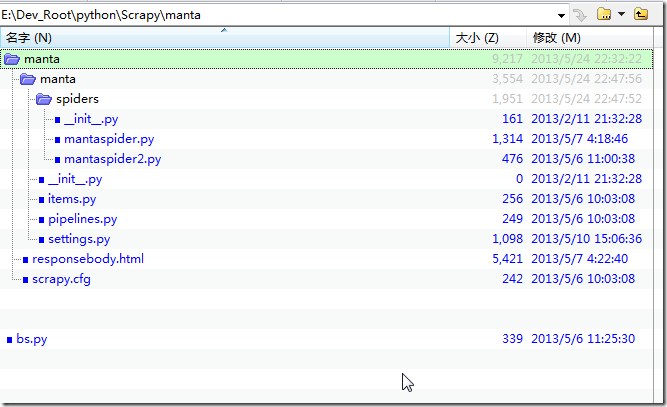
对应的,已有的返回内容responsebody,另存为html打开后,内容为:
Oops. Before you can move on, please activate your browser cookies. Incident Id: 51880fa5aa300 |
即,没有正常获取到:
的网页内容html的。
【解决过程】
1.得先参考:
搞清楚如何运行
2. 看起来,像是settings.py的配置有误,所以先去用IE9的F12调试看看本身的逻辑:
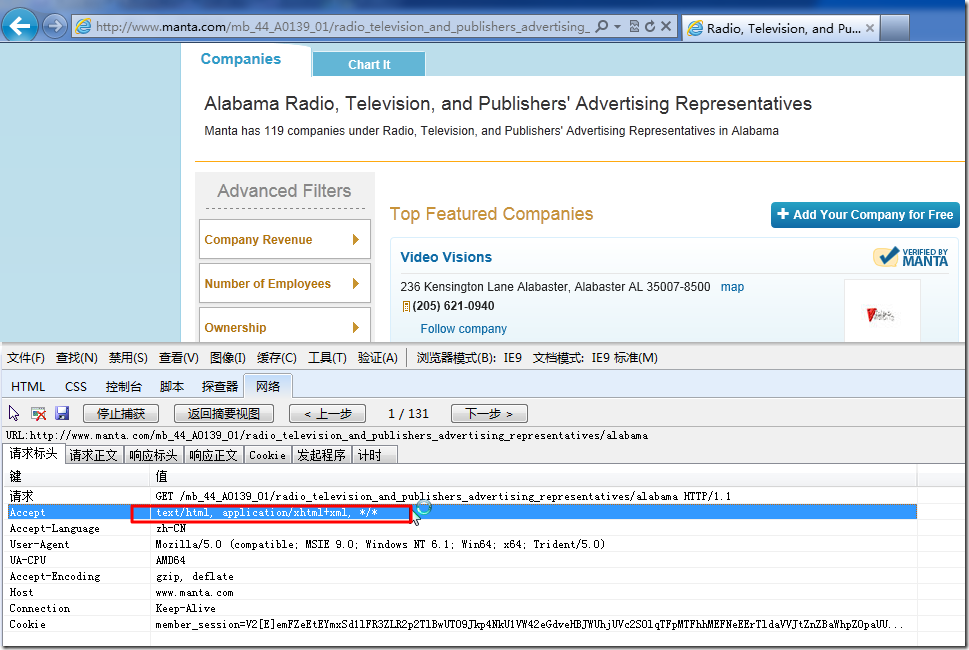
再去尝试改settings.py,结果都不行。
但是注意到,对应的代码:
COOKIES_ENABLED = True COOKIES_DEBUG = True |
运行的结果是:
2013-05-24 23:32:58+0800 [mantaspider] DEBUG: Received cookies from: <200 http://www.manta.com/mb_44_A0139_01/radio_television_and_publishers_advertising_representatives/alabama> Set-Cookie: SPSI=e760b4733042a6a1291db3b406fe8bfb ; path=/; domain=.manta.com 2013-05-24 23:32:58+0800 [mantaspider] DEBUG: Crawled (200) <GET http://www.manta.com/mb_44_A0139_01/radio_television_and_publishers_advertising_representatives/alabama> (referer: http://www.manta.com) |
即开始访问:
只返回了一个cookie:SPSI
对此,经过调试发现,其实IE9,也是同样的效果,但是由于返回的内容中,包含有:
<script type="text/javascript"> </script> |
所以IE9浏览器中,会执行对应的reload,所以会刷新页面,重新打开:
然后就可以获得上面所看到的正常的网页的内容了。
对应的调试结果就是上述的逻辑:
第一次,也只是获得了单个的cookie:

其中html中包含了reload:
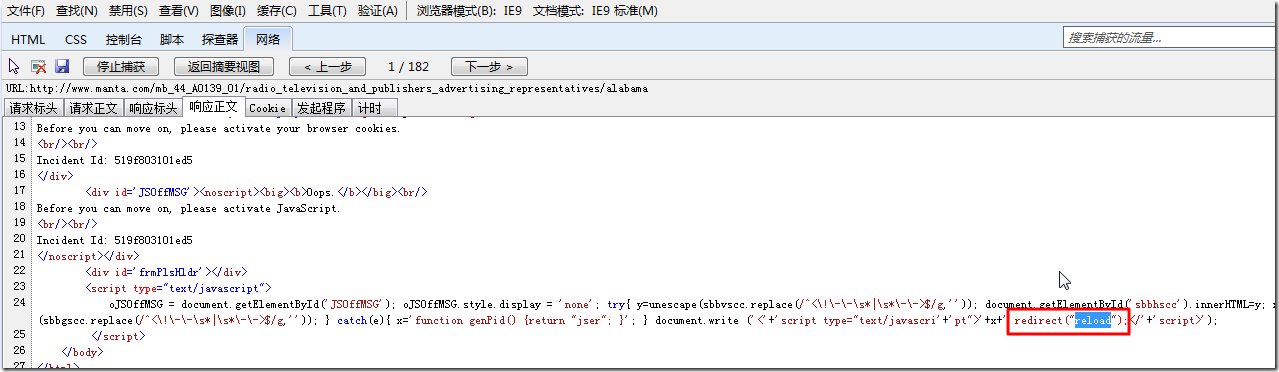
第二次,通过刷新:

获得了真正页面的html:
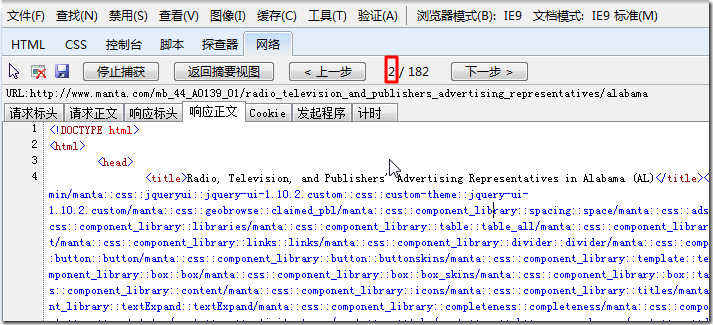
而对于如此的访问url的逻辑:
需要针对:
访问两次才可以的逻辑,貌似Scrapy中,很难实现啊。
3.参考:
去添加上RedirectMiddleware试试:
DOWNLOADER_MIDDLEWARES = {
	'scrapy.contrib.downloadermiddleware.useragent.UserAgentMiddleware': 400,
	'scrapy.contrib.downloadermiddleware.redirect.RedirectMiddleware': 600,
    'scrapy.contrib.downloadermiddleware.cookies.CookiesMiddleware':700,
}
结果是,错误依旧。
4.参考:
Capturing http status codes with scrapy spider
貌似是可以通过自定义redirect的方式,去实现页面跳转的,但是现在还不太会。
5.截止目前,代码改的乱七八糟,如下:
# Scrapy settings for manta project
#
# For simplicity, this file contains only the most important settings by
# default. All the other settings are documented here:
#
#     http://doc.scrapy.org/topics/settings.html
#

#BOT_NAME = 'manta'

SPIDER_MODULES = ['manta.spiders']
NEWSPIDER_MODULE = 'manta.spiders'

BOT_NAME = 'EchO!/2.0'

DOWNLOAD_TIMEOUT = 15
DOWNLOAD_DELAY = 2
COOKIES_ENABLED = True
#COOKIES_ENABLED = False
COOKIES_DEBUG = True
#RETRY_ENABLED = False
RETRY_ENABLED = True

REDIRECT_ENABLED = True

METAREFRESH_ENABLED = True

# Crawl responsibly by identifying yourself (and your website) on the user-agent
#USER_AGENT = 'manta (+http://www.yourdomain.com)'
#USER_AGENT = "Mozilla/5.0 (Windows NT 6.1; WOW64) AppleWebKit/537.22 (KHTML, like Gecko) Chrome/25.0.1364.97 Safari/537.22 AlexaToolbar/alxg-3.1"
USER_AGENT = "Mozilla/5.0 (compatible; MSIE 9.0; Windows NT 6.1; Win64; x64; Trident/5.0)";


DEFAULT_REQUEST_HEADERS={
    #'Accept': 'text/html,application/xhtml+xml,application/xml;q=0.9,*/*;q=0.8',
	'Accept': 'text/html, application/xhtml+xml, */*',
    #'Accept-Language': 'en',
	'Accept-Language': 'en-US',
    #'X-JAVASCRIPT-ENABLED': 'true',
	"Cache-Control":"no-cache",
	"Connection": "Keep-Alive",
	"UA-CPU":"AMD64",
	"Accept-Encoding":"gzip, deflate",
	"Referer":"http://www.manta.com",

}

DOWNLOADER_MIDDLEWARES = {
	'scrapy.contrib.downloadermiddleware.useragent.UserAgentMiddleware': 400,
	#'scrapy.contrib.downloadermiddleware.redirect.MetaRefreshMiddleware': 580,
	'scrapy.contrib.downloadermiddleware.redirect.RedirectMiddleware': 600,
    'scrapy.contrib.downloadermiddleware.cookies.CookiesMiddleware':700,
	'scrapy.contrib.downloadermiddleware.httpcache.HttpCacheMiddleware': 900,
}


#COOKIES_DEBUG=True
还是没工作。
【总结】
Scrapy,还是足够复杂,对于某url返回的js中带redirect的事情,估计还是可以用middleware实现的,只是现在自己不知道如何实现。
转载请注明:在路上 » 【记录】用Scrapy抓取manta.com