【问题】
android程序开发中,需要对于一个app中的某个AlertDialog弹出的窗口中背景色实现自定义。
目前已有的代码是:
1.res/values/styles.xml
<resources>

    <!--
        Base application theme, dependent on API level. This theme is replaced
        by AppBaseTheme from res/values-vXX/styles.xml on newer devices.
    -->
    <style name="AppBaseTheme" parent="android:Theme.Light">
        <!--
            Theme customizations available in newer API levels can go in
            res/values-vXX/styles.xml, while customizations related to
            backward-compatibility can go here.
        -->
    </style>

    <!-- Application theme. -->
    <style name="AppTheme" parent="AppBaseTheme">
        <item name="android:background">@android:color/holo_red_dark</item>
        <item name="android:textColor">@android:color/white</item>
        <item name="android:windowNoTitle">true</item>
    </style>

    <style name="Button">
        <item name="android:textColor">@android:color/holo_blue_light</item>
    </style>

    <style name="dialog" parent="@android:style/Theme.Dialog">

        <item name="android:windowBackground">@android:color/holo_red_dark</item>
    </style>

    <style name="NewAlertDialog" parent="@android:style/Theme.Holo.Dialog">
        <item name="android:windowBackground">@android:color/holo_green_light</item>
    </style>

    <style name="EditText" parent="@android:style/Widget.EditText">
        <item name="android:background">@android:color/darker_gray</item>
        <item name="android:textColor">@android:color/holo_green_light</item>
    </style>

</resources>
2.ModalAlertDialog
public class ModalAlertDialog extends AlertDialog {
    ......

	protected ModalAlertDialog(Context context,int theme) {
		super(context,theme);

		System.out.println("ModalAlertDialog theme create,Thread id is "
				+ Thread.currentThread().getId() + " dialog hashcode" + this.hashCode());
	}
3.ModalDialogCreator
public class ModalDialogCreator {
    ......

	private int mTheme = AlertDialog.THEME_DEVICE_DEFAULT_DARK;
	private Context mHost;

	public ModalDialogCreator(Context host) {
		mHost = host;
	}

	public ModalDialogCreator(Context host, int theme) {
		mHost = host;
		mTheme = theme;
	}

	private ModalAlertDialog createDialog() {
		ModalAlertDialog modalDialog = new ModalAlertDialog(mHost, mTheme);
		return modalDialog;
	}
    ......

	public ModalAlertDialog createMessageDialog(String title, String message,
			int interval) {
		final ModalAlertDialog modalDialog = createDialog();
		modalDialog.setTitle(title);
		modalDialog.setMessage(message);
		modalDialog.setIcon(android.R.drawable.ic_dialog_alert);
		modalDialog.setCancelable(false);
		setDismissInterval(modalDialog, interval);
		return modalDialog;
	}
4.MainActivity.java
    Button btnDialog = (Button) findViewById(R.id.btnDialog);
    btnDialog.setOnClickListener(new OnClickListener() {
        public void onClick(View view) {
            // DialogBuilder.write(context);

            ModalDialogCreator creator = new ModalDialogCreator(context);

            List<String> sex = new ArrayList<String>();
            sex.add("male");
            sex.add("femal");
            sex.add("unknow");
            // ModalAlertDialog dialog =
            // creator.createUpdateMessageDialog("hello", "nihao", 1000, new
            // MessageUpdateListener(){})(
            // "sex", sex, new boolean[] { true, true });
            ModalAlertDialog dialog = creator.createMessageDialog("hello", "nahao crifan", 2000);
起初的逻辑是:
在MainActivity.java去new ModalDialogCreator的creator
然后creator去createMessageDialog,传入要显示的内容。
在createMessageDialog中,会去createDialog
createDialog中会去new ModalAlertDialog,使用当前的mHost和mTheme
而mTheme即全局的默认值AlertDialog.THEME_DEVICE_DEFAULT_DARK。
目前的问题是:
其中可见styles.xml已有对应的NewAlertDialog,去配置android:windowBackground为@android:color/holo_green_light。
但是不起效果。
即,当前的AlertDialog对话框的窗口背景色,还是全局的App的背景色:@android:color/holo_red_dark
而不是希望的,上述在NewAlertDialog中配置的@android:color/holo_green_light
其中,关于AlertDialog.THEME_DEVICE_DEFAULT_DARK等值,可以参考官网的文档:
【解决过程】
1.之前去styles.xml中设置:
    <style name="CustomAlertDialog" parent="@android:style/Theme.Holo.Dialog">
        <item name="android:windowBackground">@android:color/holo_red_dark</item>
    </style>
也是没任何效果的。
2.后来参考:
自定义 Android 对话框 (AlertDialog) 的样式
虽然没有直接给出此处的答案,但是大概看懂了其逻辑:
其是通过那一堆的LinearLayout,去实现了自定义的Dialog的显示页面的结构。
然后是用:
<?xml version="1.0" encoding="utf-8"?>
<resources>

    <style name="Dialog" parent="android:style/Theme.Dialog">
        <item name="android:windowBackground">@null</item>
        <item name="android:windowNoTitle">true</item>
        <item name="android:windowIsFloating">true</item>
    </style>

</resources>
用于控制Dialog的背景色为空。
然后在CustomDialog的create()中去:
final CustomDialog dialog = new CustomDialog(context, R.style.Dialog);
其中R.style.Dialog中的Dialog,就是上述resources中自定义的那个Dialog。
即:
先自定义一个xxx样式,然后在自定义Dialog(以及我此处的AlertDialog)中,再去通过R.style.xxx的方式去使用此自定义的样式
3.然后去看此处的已有的代码。
发现:
	protected ModalAlertDialog(Context context,int theme) {
		super(context,theme);
很明显,是拿到theme后,传递给了super,即ModalAlertDialog扩展自的那个AlertDialog
即,此处的theme最终是给了AlertDialog的。
所以,想到了使用自己定义的style。
先去添加一个自己的CustomAlertDialog:
    <style name="CustomAlertDialog" parent="@android:style/Theme.Holo.Dialog">
        <item name="android:windowBackground">@android:color/holo_red_dark</item>
    </style>
再去让此处的AlertDialog使用自己的styple:
	private ModalAlertDialog createDialog() {
		//ModalAlertDialog modalDialog = new ModalAlertDialog(mHost, mTheme);
		ModalAlertDialog modalDialog = new ModalAlertDialog(mHost, R.style.CustomAlertDialog);
		return modalDialog;
	}
但是结果却还是无效,即此处的windowBackground,还是没效果。
4.后来经过尝试,实际上是background有效果。
即,改为:
    <style name="CustomAlertDialog" parent="@android:style/Theme.Holo.Dialog">
        <item name="android:background">@android:color/holo_green_light</item>
    </style>
然后就可以实现对应的效果了:
app的全局的颜色是深红色(@android:color/holo_red_dark):
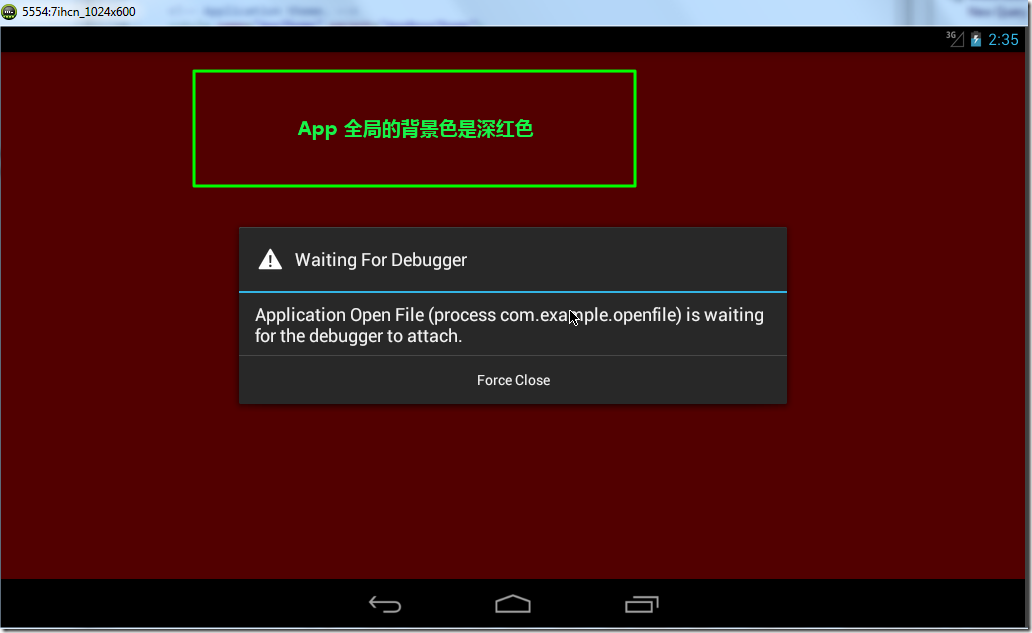
然后对应的AlertDialog的窗口背景色是亮绿色(@android:color/holo_green_light):
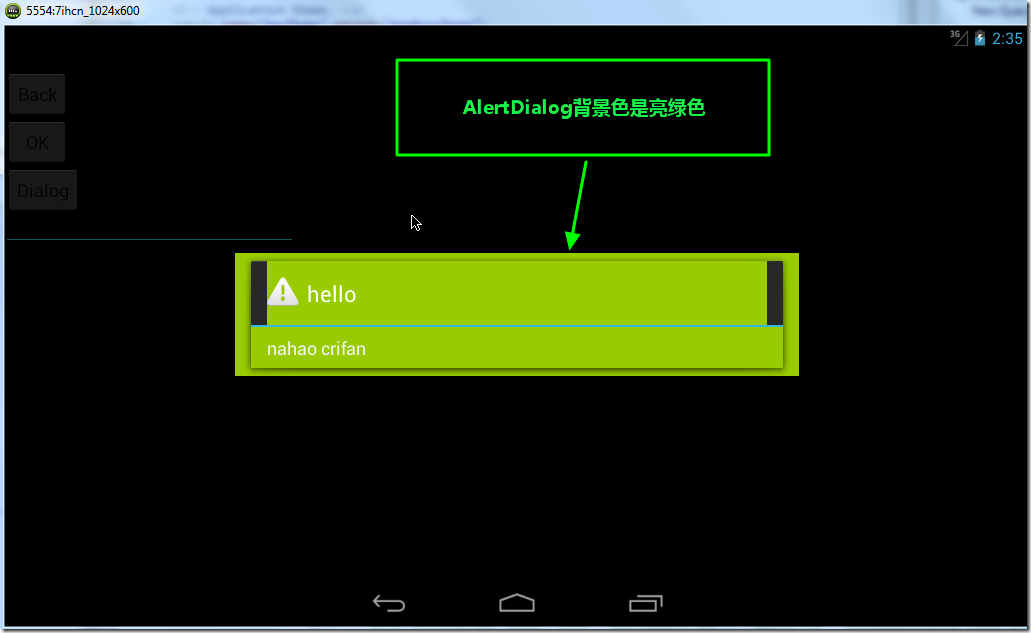
如此,即实现了我们自定义AlertDialog窗口背景色的目的了。
5.其实,后来在:
How to “theme” an Android Dialog
也给出极其简单的解释,也是此处用的方式。
【总结】
想要实现AlertDialog的窗口背景色的自定义的话,可以:
1.在res/values/styles.xml中,自定义一个style,设置背景色:
    <style name="CustomAlertDialogBackground" parent="@android:style/Theme.Holo.Dialog">
        <item name="android:background">@android:color/holo_green_light</item>
    </style>
注意是
(1)android:background,而不是android:windowBackground
(2)parent,此处是@android:style/Theme.Holo.Dialog,暂时不太清楚,别的,非Dialog的话,是否有效。
2.实现你自己的自定义的AlertDialog类,其中构造函数中,把theme传给super的AlertDialog:
public class xxxAlertDialog extends AlertDialog {

	protected xxxAlertDialog(Context context,int theme) {
		super(context,theme);
        ......
	}
3.创建自定义AlertDialog类时,把对应的之前自己的style传递进去:
xxxAlertDialog xxxDialog = new xxxAlertDialog(yourContext, R.style.CustomAlertDialogBackground);
如此,即可。
注意:
(1)CustomAlertDialogBackground是我们自定义的那个style。