折腾:
【未解决】爬取mp.codeup.cn中的英语教材电子书资源
期间,现在去模拟mp.codeup.cn去尝试写代码
模拟如下内容:
1. Request URL:
https://biz.bookln.cn/ebookpageservices/queryAllPageByEbookId.do
2. Request Method: POST
3. Status Code: 200
4. Remote Address: 1xxx.210:443
5. Referrer Policy: no-referrer-when-downgrade

Request Headers:
1. :authority: biz.bookln.cn
2. :method: POST
3. :path: /ebookpageservices/queryAllPageByEbookId.do

content-type: application/x-www-form-urlencoded
accept: application/json, text/javascript, */*; q=0.01

1. content-length: 118


Form Data:

view source:
ebookId=52365&_timestamp=1583157835&_nonce=491fd5fc-b046-4bd7-870b-ccae94ccc23b&_sign=47CBFDFACD3E0A0746E2391C7F78AD00

encoded:
1. ebookId: 52365
2. _timestamp: 1583157835
3. _nonce: 491fd5fc-b046-4bd7-870b-ccae94ccc23b
4. _sign: 47CBFDFACD3E0A0746E2391C7F78AD00
目测可能:_timestamp,_nonce,_sign可能稍微麻烦点
话说,如果只是这2本书,都不用模拟了:直接用保存的json即可。
不过为了支持更多书,还是去尝试模拟吧
感觉要:
要去搞清楚requests如何发送:
post,但是data是application/x-www-form-urlencoded的
requests application/x-www-form-urlencoded
>>> payload = {'key1': 'value1', 'key2': 'value2'}
>>> r = requests.post("
http://httpbin.org/post
", data=payload)
>>> print r.content
{
  "origin": "179.13.100.4",
  "files": {},
  "form": {
    "key2": "value2",
    "key1": "value1"
  },
  "url": "
http://httpbin.org/post
",
  "args": {},
  "headers": {
    "Content-Length": "23",
    "Accept-Encoding": "identity, deflate, compress, gzip",
    "Accept": "*/*",
    "User-Agent": "python-requests/0.8.0",
    "Host": "127.0.0.1:7077",
    "Content-Type": "application/x-www-form-urlencoded"
  },
  "data": ""
}
如果直接post,data是dict的话,默认就是:
“Content-Type”: “application/x-www-form-urlencoded”
如果想要发送json字符串,则是:
url = '
https://api.github.com/some/endpoint
'
payload = {'some': 'data'}

r = requests.post(url, data=json.dumps(payload))
对于代码:
for eachBookId in gBookIdList:
    getAllPageUrl = "
https://biz.bookln.cn/ebookpageservices/queryAllPageByEbookId.do
"
    curHeaders = deep.copy(gHeaders)
    curHeaders["Content-Type"] = "application/x-www-form-urlencoded"
    postDict = {
      "ebookId": eachBookId
    }
    resp = requests.post(getAllPageUrl, headers=gHeaders, data=postDict)
    print("resp=%s" % resp)
先去调试看看再说
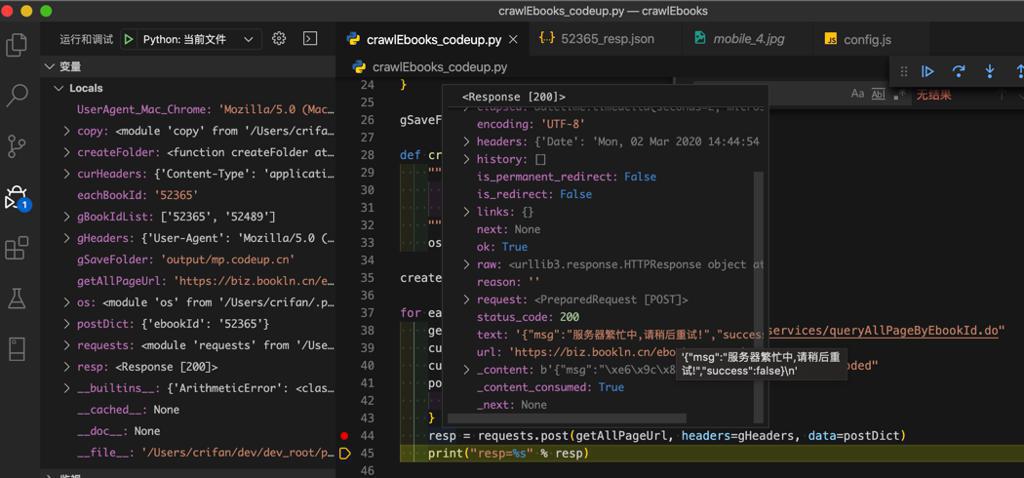
'{"msg":"服务器繁忙中,请稍后重试!","success":false}\n'很明显,此处参数不对。
加了其他一些header,估计是没关系的:
    curHeaders["Accept"] = "application/json, text/javascript, */*; q=0.01"
    curHeaders["origin"] = "
http://mp.codeup.cn
"
    curHeaders["referer"] = "
http://mp.codeup.cn/book/sample2.htm?id=%s
" % eachBookId
    curHeaders["sec-fetch-dest"] = "empty"
    curHeaders["sec-fetch-mode"] = "cors"
    curHeaders["sec-fetch-site"] = "cross-site"
结果:
问题依旧。
看来要去想办法实现sign了:
【未解决】分析mp.codeup.cn中核心参数_timestamp、_nonce、_sign逻辑
其中已获取到js源码。
暂时懒得转python了。
等有需要再去转Python。
转载请注明:在路上 » 【未解决】模拟mp.codeup.cn中调用queryAllPageByEbookId.do返回json数据