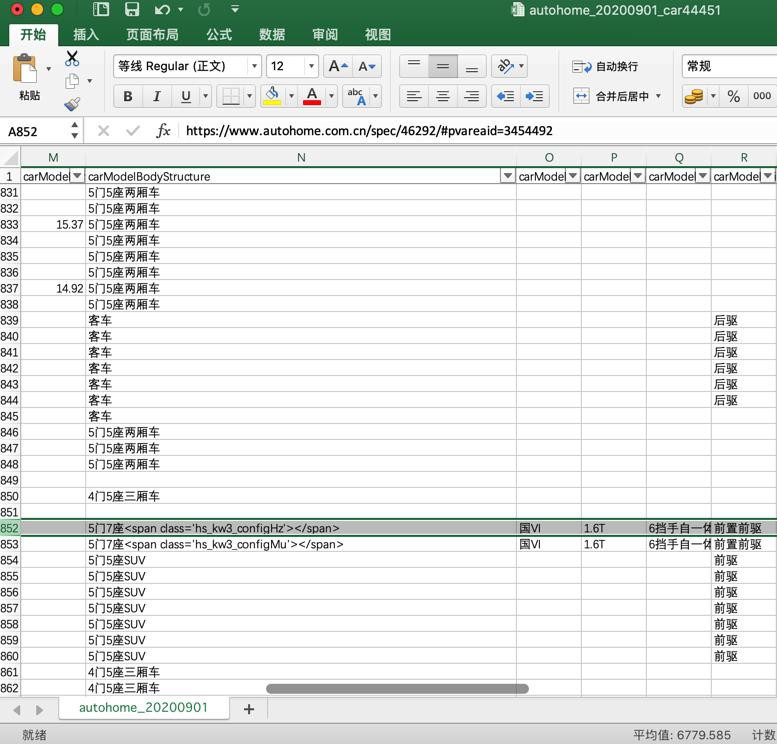
最新代码,抓取结果中发现有:
5门7座<span class='hs_kw3_configHz'></span>
去看看页面:
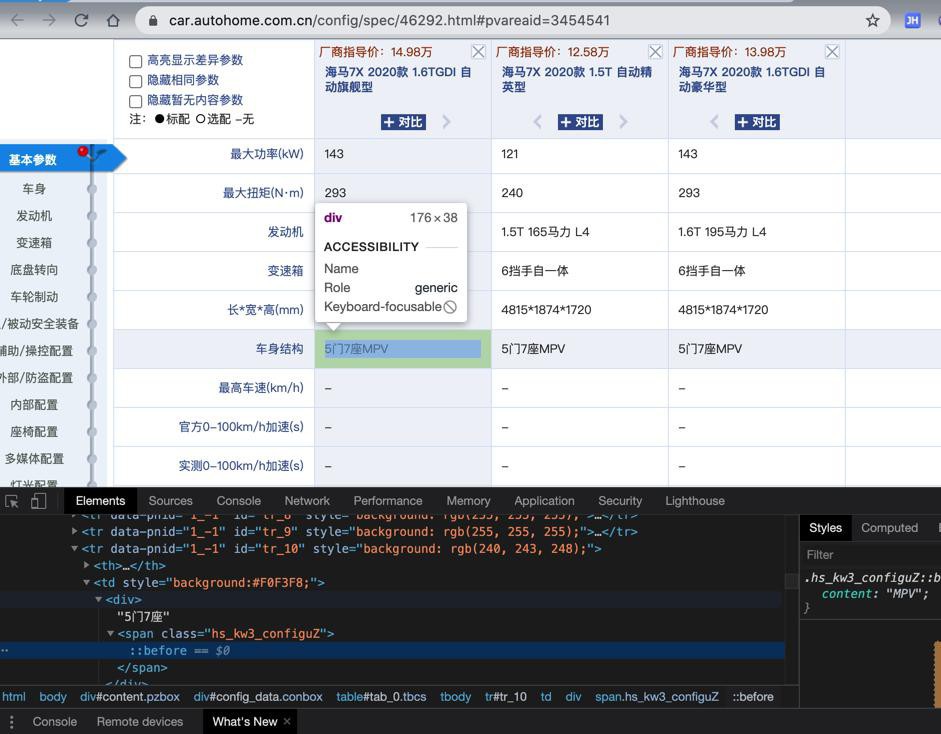
5门7座SUV
去代码中调试
debug/海马7X_46292_fullHtml.html
{
            "id": 1147,
            "name": "车身结构",
            "pnid": "1_-1",
            "valueitems": [{
              "specid": 46292,
              "value": "5门7座<span class='hs_kw3_configFS'></span>"
            }, {
              "specid": 46291,
              "value": "5门7座<span class='hs_kw3_configFS'></span>"
            }, {
              "specid": 47276,
              "value": "5门7座<span class='hs_kw3_configFS'></span>"
            }]
          },
对于此处的span,现在(从页面上看到)知道是:MPV
不过是否span一直是MPV,就要去找找看了
目前发现是
debug/奥迪A3_configSpec_43593.html
                        "id": 1147,
                        "name": "车身结构",
                        "pnid": "1_-1",
                        "valueitems": [{
                            "specid": 43593,
                            "value": "5门5座两厢车"
                        }, {

                    }, {
                        "id": 1147,
                        "name": "车身结构",
                        "pnid": "1_-1",
                        "valueitems": [{
                            "specid": 43593,
                            "value": "两厢车"
                        }, {
debug/奥迪Q2L_etron_纯电智酷型_42875_afterRunJs.html
          }, {
            "id": 1147,
            "name": "车身结构",
            "pnid": "1_-1",
            "valueitems": [{
              "specid": 42875,
              "value": "5门5座SUV"
            }, {
              "specid": 39893,
              "value": "5门5座SUV"
            }]
          }
。。。
          }, {
            "id": 1147,
            "name": "车身结构",
            "pnid": "1_-1",
            "valueitems": [{
              "specid": 42875,
              "value": "SUV"
            }, {
              "specid": 39893,
              "value": "SUV"
            }]
          },
以为:不是固定的呢
突然发现:
或许是:
第二个id的1147的值
好像就是第一个最后的部分
-》或许找到第二个1147的id,就可以找到最后的 span要被替换的值了
发现关系了:
debug/奥迪Q2L_etron_纯电智酷型_42875_afterRunJs.html
{
          "name": "车身",
          "paramitems": [{
            "id": 5886,
            "name": "<span class='hs_kw3_configxv'></span>(mm)",
            "pnid": "1_-1",
            "valueitems": [{
              "specid": 42875,
              "value": "4237"
            }, {
              "specid": 39893,
              "value": "4237"
            }]
          }
。。。
, {
            "id": 1147,
            "name": "车身结构",
            "pnid": "1_-1",
            "valueitems": [{
              "specid": 42875,
              "value": "SUV"
            }, {
              "specid": 39893,
              "value": "SUV"
            }]
          }
是 车身的子项 中有个:车身结构 值是正常的。
但是发现郁闷了:
debug/海马7X_46292_fullHtml.html
 {
            "id": 1147,
            "name": "车身结构",
            "pnid": "1_-1",
            "valueitems": [{
              "specid": 46292,
              "value": "5门7座<span class='hs_kw3_configFS'></span>"
            }, {
              "specid": 46291,
              "value": "5门7座<span class='hs_kw3_configFS'></span>"
            }, {
              "specid": 47276,
              "value": "5门7座<span class='hs_kw3_configFS'></span>"
            }]
          },
。。
{
          "name": "车身",
          "paramitems": [
。。。
}, {
            "id": 1147,
            "name": "车身结构",
            "pnid": "1_-1",
            "valueitems": [{
              "specid": 46292,
              "value": "<span class='hs_kw3_configFS'></span>"
            }, {
              "specid": 46291,
              "value": "<span class='hs_kw3_configFS'></span>"
            }, {
              "specid": 47276,
              "value": "<span class='hs_kw3_configFS'></span>"
            }]
          }
-》子项中 也是加了密的cs部分,不是普通文字
去找找页面中,是否有MPV部分
并没有。
另外搜结果中:<span
也是有各种可能:
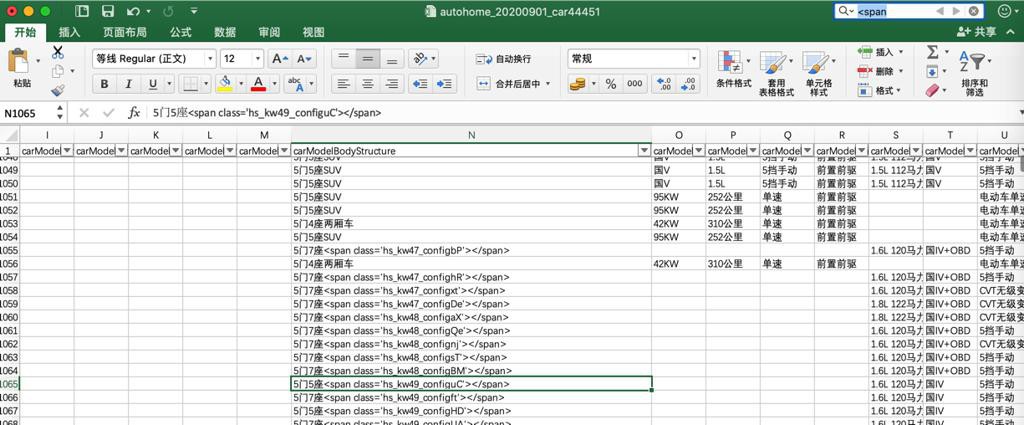
- 5门4座两厢车
- 5门5座SUV
- 5门7座<span class=’hs_kw47_confighR’></span>
等等
并不是 span就一定是SUV
以及:
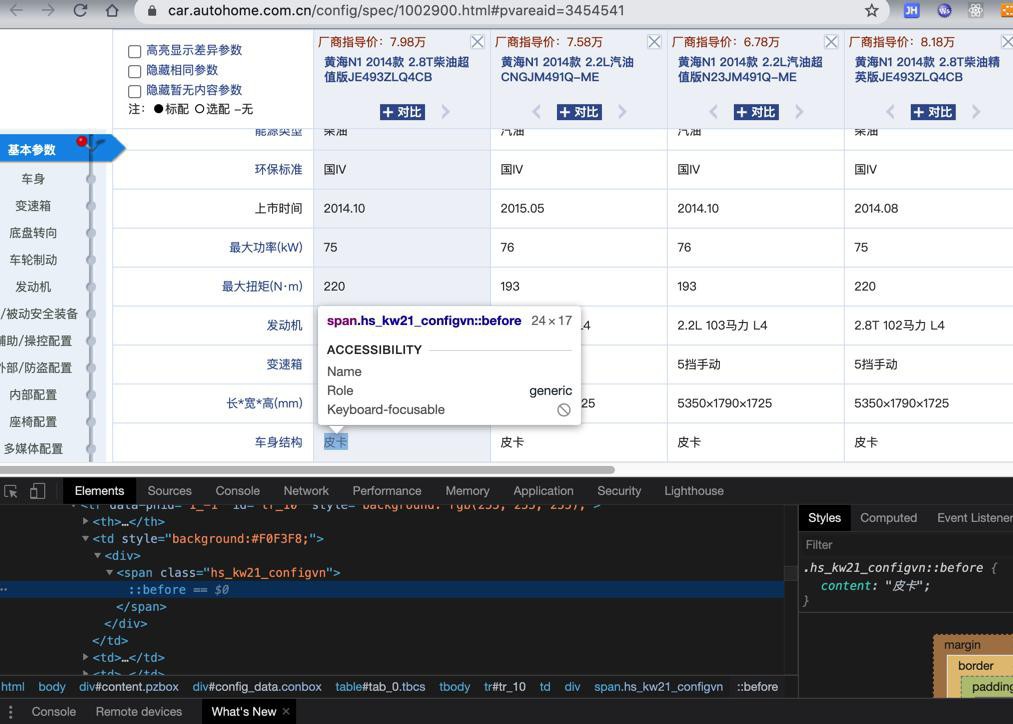
是:
<span class='hs_kw21_configqk'></span>
完全没有文字
页面中看到是:皮卡
后来发现一个细节,貌似可以利用:
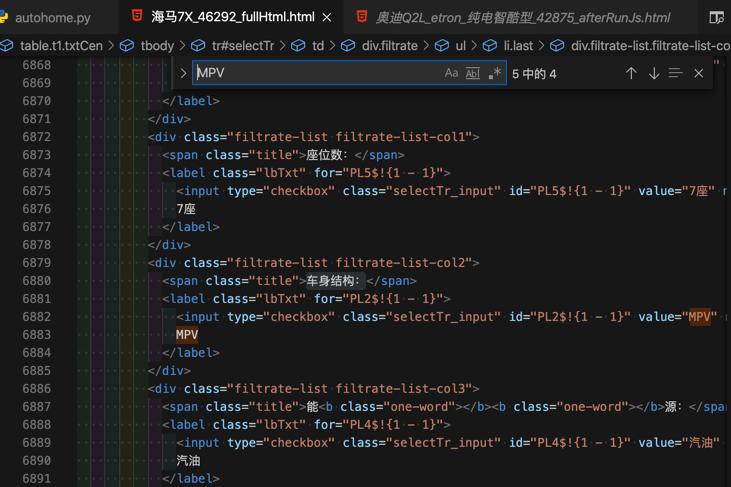
                    <div class="filtrate-list filtrate-list-col2">
                      <span class="title">车身结构:</span>
                      <label class="lbTxt" for="PL2$!{1 - 1}">
                        <input type="checkbox" class="selectTr_input" id="PL2$!{1 - 1}" value="MPV" name="carStruct">
                        MPV
                      </label>
                    </div>
去看了看,对应页面上的:
选项:
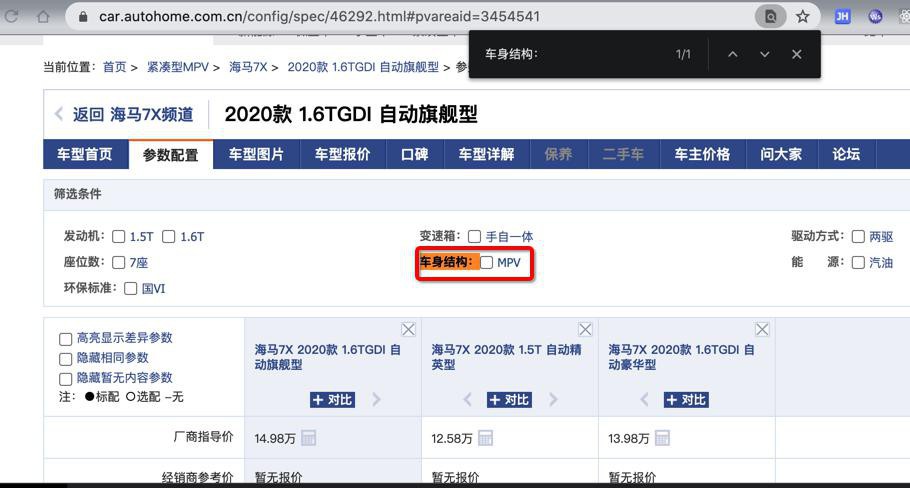
看了看,另外一个也是:
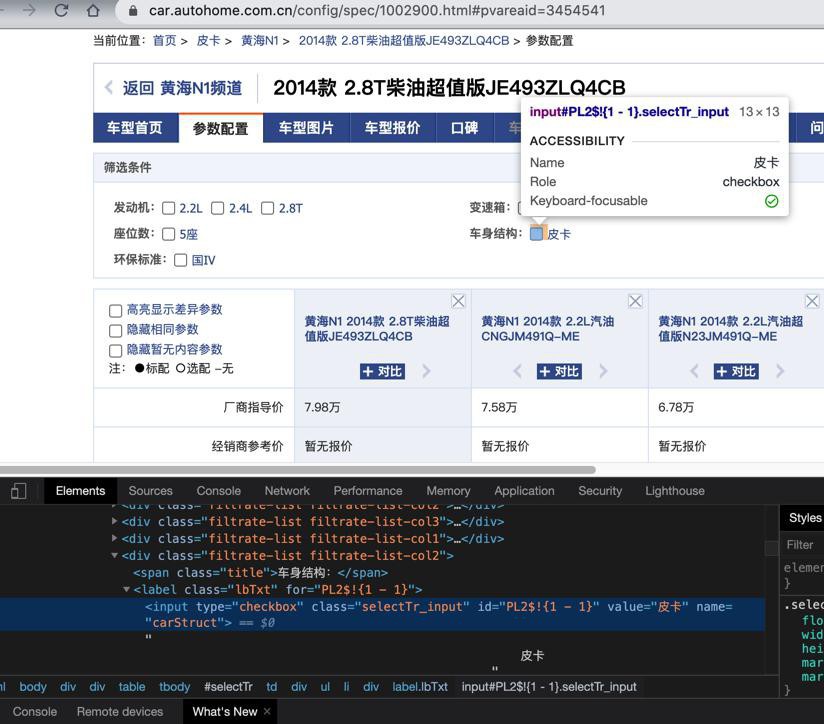
-》貌似其他的都是?
再去看看几个
都是这个逻辑。
-》那就可以去写代码了
结果期间想要提取 车身结构: 的sibling的label下的input的value的值
对于PySpider自带PyQuery很不方便,所以还是算了,改用BeautifulSoup吧
去安装BeautifulSoup
pip install bs4
代码中:
from bs4 import BeautifulSoup
                soup = BeautifulSoup(curHtml, "html.parser")
                print("soup=%s" % soup)
去调试
是可以正常解析出soup的
接着发现,想要直接匹配到 text() == 车身结构:的节点的
好像只能用 function了?
找到了:
soup.find_all("a",text="Elsie")
# [<a href="http://example.com/elsie" class="sister" id="link1">Elsie</a>]
去试试
bodyStructureSpanSoup = soup.find(text="车身结构:", attrs={"class":"title"})结果:
可以找到节点:
bodyStructureSpanSoup=<span class="title">车身结构:</span>
继续找,结果
siblingLabelSoup = bodyStructureSpanSoup.next_sibling
slibling是空
siblingLabelSoup=
所以干脆:
要么从next_siblings,再去找
或者从parent找label
还是后者吧
不过也去调试看看
                print("bodyStructureSpanSoup=%s" % bodyStructureSpanSoup)
                emptySoup = bodyStructureSpanSoup.next_sibling
                print("emptySoup=%s" % emptySoup)
                siblingLabelSoup = emptySoup.next_sibling
                print("siblingLabelSoup=%s" % siblingLabelSoup)
结果:
是能找到的:
siblingLabelSoup=<label class="lbTxt" for="PL2$!{1 - 1}">
<input class="selectTr_input" id="PL2$!{1 - 1}" name="carStruct" type="checkbox" value="MPV"/>
                                                    MPV
                                                </label>
但是逻辑上不好。
所以还是用从parent找label
不过期间发现有个细节要注意:
                    <div class="filtrate-list filtrate-list-col1">


                      <span class="title">发动机:</span>
                      <label class="lbTxt" for="PL0$!{1 - 1}">
                        <input type="checkbox" class="selectTr_input" id="PL0$!{1 - 1}" value="1.5T" name="engine">
                        1.5T
                      </label>
                      <label class="lbTxt" for="PL0$!{2 - 1}">
                        <input type="checkbox" class="selectTr_input" id="PL0$!{2 - 1}" value="1.6T" name="engine">
                        1.6T
                      </label>
                    </div>
不能确定div下面只有一个label的input
不过只要第一个即可
不过话说 车身结构: 下面只有一个
然后发现其实有条件是唯一的,所以改为:
                # # print("bodyStructureSpanSoup=%s" % bodyStructureSpanSoup)
                # # emptySoup = bodyStructureSpanSoup.next_sibling
                # # print("emptySoup=%s" % emptySoup)
                # # siblingLabelSoup = emptySoup.next_sibling
                # # print("siblingLabelSoup=%s" % siblingLabelSoup)
                # parentDivSoup = bodyStructureSpanSoup.parent
                # print("parentDivSoup=%s" % parentDivSoup)
                # inputSoup = parentDivSoup.find("input", attrs={"type":"checkbox", "class":"selectTr_input", "name":"carStruct"})
                carStructSoup = soup.find("input", attrs={"type":"checkbox", "class":"selectTr_input", "name":"carStruct"})
                print("carStructSoup=%s" % carStructSoup)
是可以的:
carStructSoup=<input class="selectTr_input" id="PL2$!{1 - 1}" name="carStruct" type="checkbox" value="MPV"/>不过,发现也可以不用BeautifulSoup了,改用自带PyQuery:
                carStructDoc = response.doc("input[name=carStruct]")
                print("carStructDoc=%s" % carStructDoc)
也是可以的:
carStructDoc=<input type="checkbox" class="selectTr_input" id="PL2$!{1 - 1}" value="MPV" name="carStruct" />
                                                    MPV
那就继续多去调试几个情况
不过要写完这部分处理代码:
                carStructDoc = response.doc("input[name=carStruct]")
                print("carStructDoc=%s" % carStructDoc)
                bodyStructureValue = carStructDoc.attr["value"]
                print("bodyStructureValue=%s" % bodyStructureValue)
                itemValue = itemValue.replace(bodySpan, bodyStructureValue)
                print("itemValue=%s" % itemValue)
输出:
in processSpecialKeyValue
itemKey=carModelBodyStructure, itemValue=5门7座<span class='hs_kw3_configII'></span>
process special carModelBodyStructure value
foundSpan=<_sre.SRE_Match object; span=(4, 41), match="<span class='hs_kw3_configII'></span>">
bodySpan=<span class='hs_kw3_configII'></span>
carStructDoc=<input type="checkbox" class="selectTr_input" id="PL2$!{1 - 1}" value="MPV" name="carStruct" />
                                                    MPV

bodyStructureValue=MPV
itemValue=5门7座MPV
是对的。
去调试其他的
itemKey=carModelBodyStructure, itemValue=<span class='hs_kw20_configel'></span>
process special carModelBodyStructure value
foundSpan=<_sre.SRE_Match object; span=(0, 38), match="<span class='hs_kw20_configel'></span>">
bodySpan=<span class='hs_kw20_configel'></span>
carStructDoc=<input type="checkbox" class="selectTr_input" id="PL2$!{1 - 1}" value="皮卡" name="carStruct" />
皮卡
bodyStructureValue=皮卡
itemValue=皮卡是对的。
也是对的
itemKey=carModelBodyStructure, itemValue=5门7座<span class='hs_kw4_configVC'></span>
process special carModelBodyStructure value
foundSpan=<_sre.SRE_Match object; span=(4, 41), match="<span class='hs_kw4_configVC'></span>">
bodySpan=<span class='hs_kw4_configVC'></span>
carStructDoc=<input type="checkbox" class="selectTr_input" id="PL2$!{1 - 1}" value="MPV" name="carStruct" />
                                                    MPV

bodyStructureValue=MPV
itemValue=5门7座MPV
看来是没问题了。
【总结】
此处最后是用代码:
                carStructDoc = response.doc("input[name=carStruct]")
                print("carStructDoc=%s" % carStructDoc)
                bodyStructureValue = carStructDoc.attr["value"]
                print("bodyStructureValue=%s" % bodyStructureValue)
                itemValue = itemValue.replace(bodySpan, bodyStructureValue)
print("itemValue=%s" % itemValue)把config中carModelBodyStructure的值:
5门7座<span class='hs_kw4_configVC'></span>
用页面顶部的选项:
                <div class="filtrate-list filtrate-list-col2">
                    <span class="title">车身结构:</span>
                    <label class="lbTxt" for="PL2$!{1 - 1}">
                        <input type="checkbox" class="selectTr_input" id="PL2$!{1 - 1}" value="MPV" name="carStruct">
                        MPV
                    </label>
                </div>
中的值:MPV
去把:
<span class='hs_kw4_configVC'></span>
替换后成为希望的:
5门7座MPV
转载请注明:在路上 » 【已解决】汽车之家车型车系数据:车身结构的值包含span标签