现有一个And Design的reactjs的后台管理web页面的项目,
在Chrome浏览器中点击一个下载链接时,会新建页面,弹框下载:
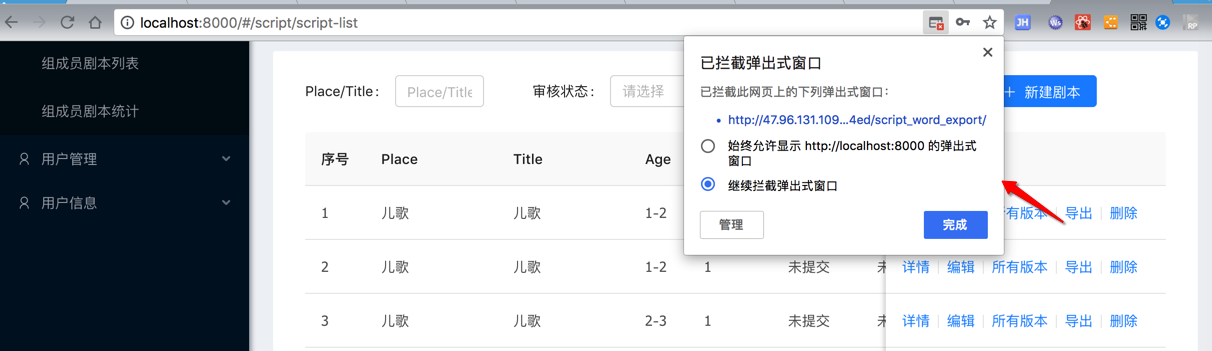
不希望弹框下载,而直接是普通的点击下载文件,类似于:
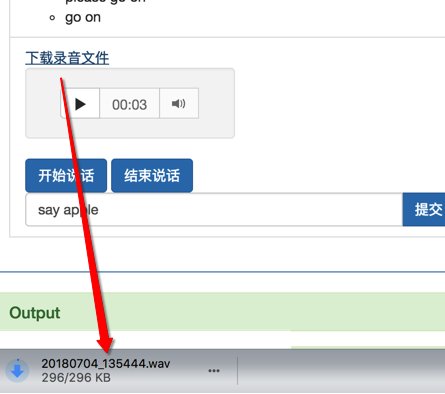
然后出现问题:
【已解决】ant design的reactjs去npm install时需要下载puppeteer的Chromium且速度很慢
然后去本地测试,结果出错:
然后再去解决此处的问题:
先去看看代码中,是如何弹框下载的
web前端代码调用逻辑是:
<code><a href="javascript:;" onClick={() => this.handleExport(record)} >导出</a>
</code>handleExport = (record) => {
const { dispatch } = this.props;
dispatch({
type: ‘script/scriptWordExport’,
payload: record.id,
});
};
export async function scriptWordExport(scriptID) {
return request(`${apiPrefix}/scripts/${scriptID}/script_word_export/`, {
headers: constructHeaders(),
});
}
Django后端的的api是:
<code>    @detail_route(
        methods=['get'],
        url_path='script_word_export',
        url_name='script_word_export',
        permission_classes=[
            AllowAny,
        ])
    def script_word_export(self, request, pk=None):
        script = self.get_object()
        script_text = []
        script_text.append('作者: ' + script.author.username)
...
        file_dir = os.path.join(settings.BASE_DIR, 'apps', 'media')
        file_name = script.title + '_' + datetime.datetime.now().strftime("%Y-%m-%d %H:%M:%S")
        document.save(file_dir + '/' + file_name + '.docx')

        with open(file_dir + '/' + file_name + '.docx', 'rb')  as f:
            response = HttpResponse(f, content_type='application/vnd.openxmlformats-officedocument.wordprocessingml.document')
            response['Content-Disposition'] = 'attachment; filename=' + 'script_' + file_name + '.docx'
            response['Access-Control-Allow-Origin'] = '*'
            return response
</code>
看起来是:
后端返回HttpResponse
其中设置了content-type以及Content-Disposition
而之前自己的用过的Flask返回文件的话,则是用的是:
<code><-------------------------------------- # Flask API <-------------------------------------- def sendFile(fileBytes, contentType, outputFilename): """Flask API use this to send out file (to browser, browser can directly download file)""" return send_file( io.BytesIO(fileBytes), # io.BytesIO(fileObj.read()), mimetype=contentType, as_attachment=True, attachment_filename=outputFilename ) </code>
然后浏览器就可以直接下载到文件了。
就不会有弹框。
antd pro 点击下载文件
使用request请求文件下载的接口后不会下载文件,是不是被什么配置拦截了? · Issue #1456 · ant-design/ant-design-pro
请问excel导出也就是文件下载有处理办法吗 · Issue #543 · ant-design/ant-design-pro
File storage API | Django documentation | Django
python – Django Download File Url in Template – Stack Overflow
URL调度器 | Django documentation | Django
How to link to a downloadable PDF/DOC file? : Forums : PythonAnywhere
How do I make a download button in my web page work with Django? – Quora
django return file url
python – Having Django serve downloadable files – Stack Overflow
johnsensible/django-sendfile: xsendfile etc wrapper
很像我要的效果:
就是实现之前Flask中sendfile的效果
传入文件名和其他参数即可。
去试试
不过好像还是不够完美
先去看看:
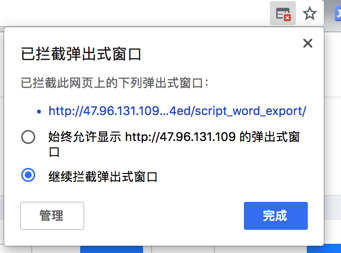
<code>已拦截弹出式窗口
已拦截此网页上的下列弹出式窗口:
始终允许显示 的弹出式窗口
继续拦截弹出式窗口
</code>
Django chrome 文件下载 已拦截
Django chrome 文件下载 已拦截弹出式窗口
正常下载链接,被Google浏览器拦截 – Google Product Forums
Chrome提示下载文件是恶意文件已将其拦截怎么办_百度经验
html使用a标签不通过后台实现直接下载 – Martin的专栏 – SegmentFault 思否
reactjs a href download file
html5 – Download attribute in anchor tag in React component – Stack Overflow
就是前面说的:
<code><a target="_blank" href="your_url" download="filename.doc">点击下载文件</a> </code>
Improve handling of download attribute · Issue #1337 · facebook/react
How do I download a file when I click an HTML button? – Quora
HTML5 <a> Download Attribute – Sarah Bruce – Medium
Error when trying to download file with react-pdf – Questions – Prisma Forum
还是直接试试再说:
<code>➜ NaturlingCmsServer git:(master) ✗ pip3 install django-sendfile Collecting django-sendfile Downloading https://files.pythonhosted.org/packages/a3/01/2291deb21fe3036e16a22bb293f2bcbd095e05476f66d9d10eb4b44ff758/django-sendfile-0.3.11.tar.gz Requirement already satisfied: Django>=1.3 in /usr/local/lib/python3.6/site-packages (from django-sendfile) (2.0.6) Requirement already satisfied: pytz in /usr/local/lib/python3.6/site-packages (from Django>=1.3->django-sendfile) (2018.5) Building wheels for collected packages: django-sendfile Running setup.py bdist_wheel for django-sendfile ... done Stored in directory: /Users/crifan/Library/Caches/pip/wheels/da/02/7b/a3f430cc8f6a2a97e2d110d3a823e930f4e2e925e5bcc752c4 Successfully built django-sendfile Installing collected packages: django-sendfile Successfully installed django-sendfile-0.3.11 </code>
然后再去:
xxx/conf/development/settings.py
<code>SENDFILE_BACKEND = 'sendfile.backends.development'
</code>
和
<code>from sendfile import sendfile

        return sendfile(
            request,
            full_file_name,
            attachment=True,
            attachment_filename=attachment_filename)
</code>
结果:
问题依旧-》
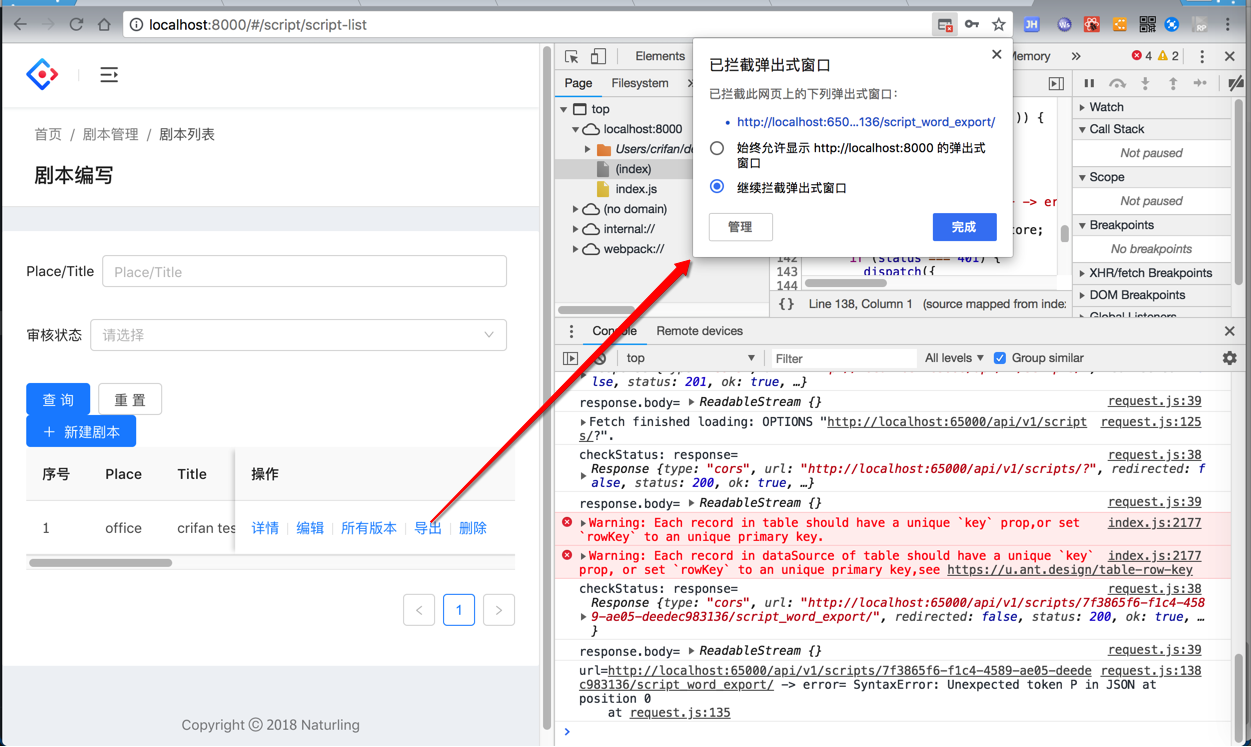
看起来还是前端web端问题。
去试了试Chrome中,允许弹框,就可以
打开新的tab页面,然后下载到docx文件:
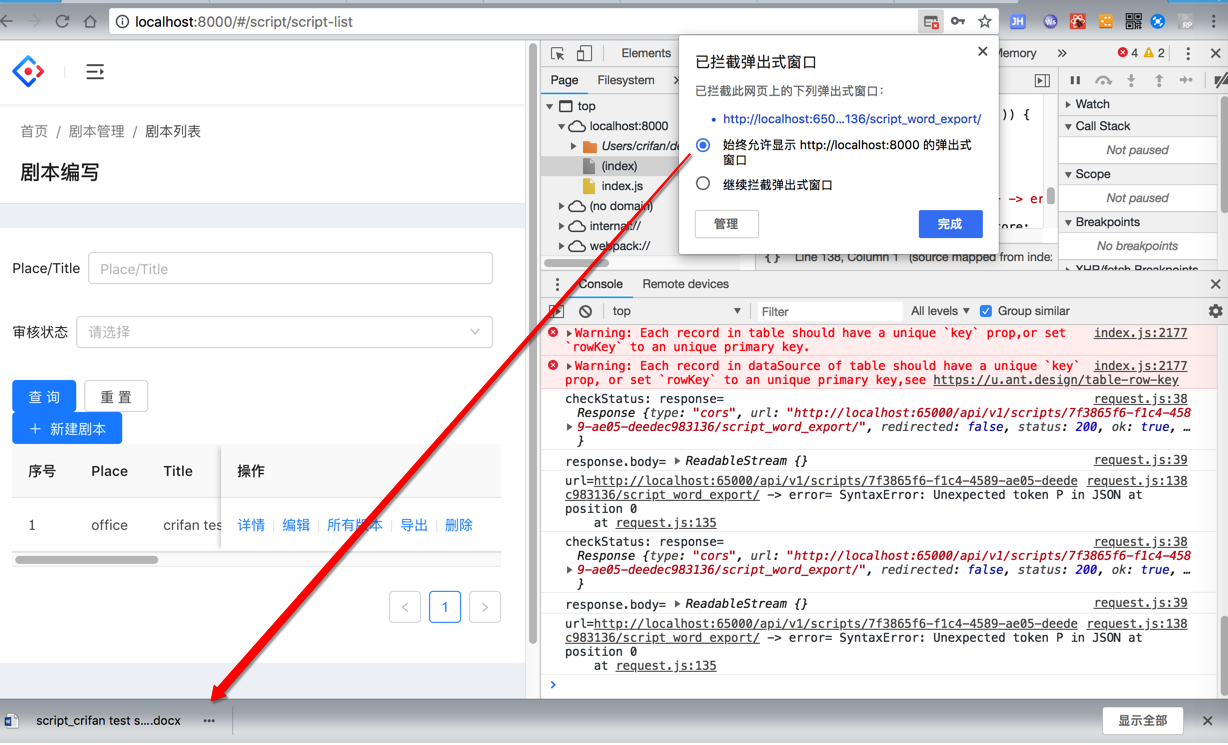
所以感觉还是:
<code><a href="javascript:;" onClick={() => this.handleExport(record)} >导出</a>
</code>的写法有问题
reactjs generate a href
javascript – How to create dynamic href in react render function? – Stack Overflow
不过,此处即使可以方便的生成要下载的docx文件的下载地址
比如:
http://localhost:65000/api/v1/scripts/7f3865f6-f1c4-4589-ae05-deedec983136/script_word_export/
但是也会有问题:
因为这个url需要传递header:
Authorization: JWT xxx
才能访问
而如果把url直接放到:
<a href=”此处的url”>
是没法点击下载的,缺少jwt的token。
不过,此处想到一个折中的,曲线救国的办法:
reactjs中,去下载到这个docx文件,然后保存到本地(浏览器内部临时保存),然后再去下载保存到用户的本地
reactjs a href but with token
但是好像有个问题:
需要用户操作两次才行:
第一次是点击获取文件,保存临时文件,更新a的hrefde 下载地址
然后再点击类似于之类的:
<code><a id="downloadSpeakAudio" download="" href="">下载录音文件<a/> </code>
才能下载文件
好像不方便点击一次就 内部生成url,并模拟点击a去触发下载
然后考虑可以:
内部生成下载的文件的url,并且返回到数据后,保存到临时文件中
把临时文件的地址放到a的href中,供下载
而为了避免需要用户再次点击才能下载,则想办法在js中模拟用户点击a的href,主动触发下载
从而实现:
用户点击了一次
(内部是先获取url并下载文件
再模拟点击下载)
开始下载(a的href的)文件
(而无需弹框)
reactjs download not window.open
reactjs download without window.open
reactjs – how can i handle an event to open a window in react js? – Stack Overflow
[SOLVED] Downloading files without window.open(), or opening a window iframepanel.
How to open a pdf downloaded from an API with JavaScript – Jayway
好像是可以试试reactjs中模拟a的click
Launch download in the same tab without opening new tab or window in Javascript – Stack Overflow
不过现在想到一个感觉更好的办法:
对于文件下载的url来说,可以考虑把token放到url的query string中
这样就可以直接把完整url放到a的href了,点击后就可以直接下载到文件了,
估计就不用弹框了。
去试试:
【已解决】Django中对于单个REST的接口把JWT的token验证放到query string的url中
【总结】
通过在Django中继承JSONWebTokenAuthentication,支持优先从query string中获取jwt的token,然后即可支持web前端传入url,可以解析url中的token了:
后端:
apps/util/jwt_token.py
<code># from rest_framework_jwt.authentication import BaseJSONWebTokenAuthentication
from rest_framework_jwt.authentication import JSONWebTokenAuthentication
from rest_framework.authentication import get_authorization_header
import logging
logger = logging.getLogger('django')
class JWTAuthByQueryStringOrHeader(JSONWebTokenAuthentication):
# class JWTAuthByQueryStringOrHeader(BaseJSONWebTokenAuthentication):
"""
Extend the TokenAuthentication class to support querystring authentication
in the form of "http://www.example.com/?jwt_token=<token_key>"
"""
def get_jwt_value(self, request):
# Check if 'jwt_token' is in the request query params.
# Give precedence to 'Authorization' header.
logger.debug("request=%s", request)
queryParams = request.query_params
reqMeta = request.META
logger.debug("queryParams=%s", queryParams)
logger.debug("reqMeta=%s", reqMeta)
if ('jwt_token' in queryParams) and ('HTTP_AUTHORIZATION' not in reqMeta):
jwt_token = queryParams.get('jwt_token')
# got jwt token from query parameter
logger.debug("jwt_token=%s", jwt_token)
return jwt_token
else:
# call JSONWebTokenAuthentication's get_jwt_value
# to get jwt token from header of 'Authorization'
return super(JWTAuthByQueryStringOrHeader, self).get_jwt_value(request)
</code>然后再去更新配置,把之前的JSONWebTokenAuthentication改为JWTAuthByQueryStringOrHeader:
/conf/development/settings.py
<code># django-restframework and jwt settings
REST_FRAMEWORK = {
    ...
    'DEFAULT_AUTHENTICATION_CLASSES': (
        # 'rest_framework_jwt.authentication.JSONWebTokenAuthentication',
        'apps.util.jwt_token.JWTAuthByQueryStringOrHeader',
        'rest_framework.authentication.SessionAuthentication',
        'rest_framework.authentication.BasicAuthentication',
    ),
    ...
}
</code>
web前端:
保证a的href中直接传入对应的带jwt_token的url:
src/utils/token.js
<code>export function getEncodedToken() {
  const token = localStorage.getItem('token')
  if (token) {
    return token
  } else {
    return ""
  }
}
</code>
src/services/api.js
<code>export function scriptWordExportUrl(scriptID, jwtToken) {
  return `${apiPrefix}/scripts/${scriptID}/script_word_export/?jwt_token=${jwtToken}`;
}
</code>
src/routes/Script/ScriptList.js
<code>import { scriptWordExportUrl } from '../../services/api';
import { getEncodedToken } from '../../utils/token';
// http://localhost:65000/api/v1/scripts/3d9e77b0-e538-49b8-8790-60301ca79e1d/script_word_export/?jwt_token=eyJ0eXAiOiJKV1QiLCJhbGciOiJIUzI1NiJ9.eyJ1c2VyX2lkIjoiMWVkMGEwZDgtMmFiYi00MDFkLTk5NTYtMTQ5MzcxNDIwMGUzIiwidXNlcm5hbWUiOiJsc2R2aW5jZW50IiwiZXhwIjoxNTMxOTAyOTU0LCJlbWFpbCI6InZpbmNlbnQuY2hlbkBuYXR1cmxpbmcuY29tIn0.wheM7Fmv8y8ysz0pp-yUHFqfk-IQ5a8n_8OplbYkj7s
const encodedJwtToken = getEncodedToken()
const exportScritpUrl = scriptWordExportUrl(record.id, encodedJwtToken)
return (
<Fragment>
...
<a href={exportScritpUrl} >导出</a>
...
</Fragment>
)
},
</code>然后点击导出,才能调用,url中带jwt_token,才能传入token到后台接口,用于拥有权限,才能下载导出文件:
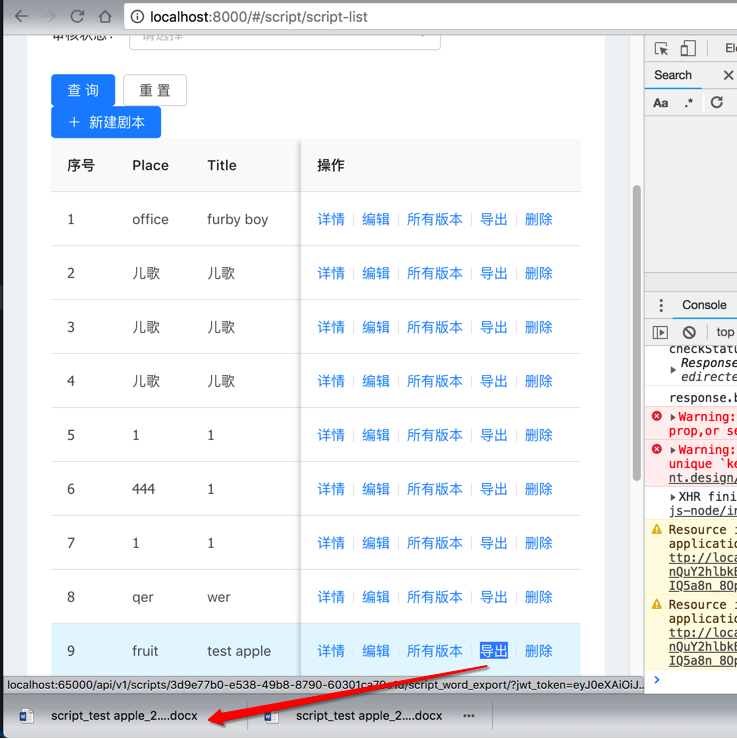
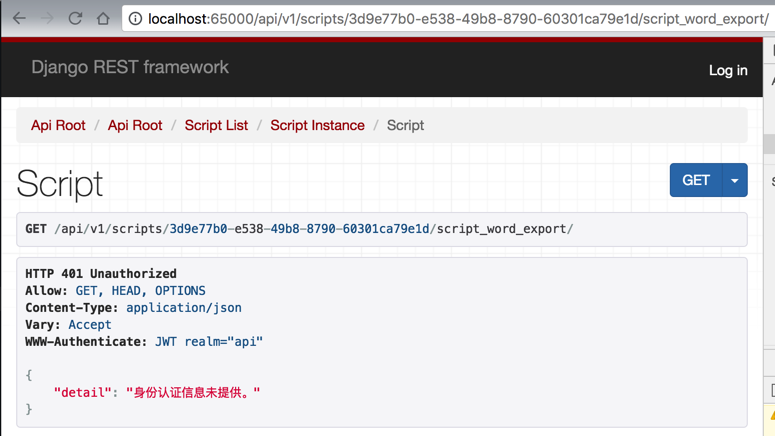
而如果单独输入url,没有token的话,则是无法下载的:
<code>http://localhost:65000/api/v1/scripts/3d9e77b0-e538-49b8-8790-60301ca79e1d/script_word_export/
</code>