现有别人写的一个Django的后台。
自己本地已经根据步骤搭建了环境,现在希望能看到Swagger的API文档
默认(未登录用户的)现在只能看到公开的一些api:
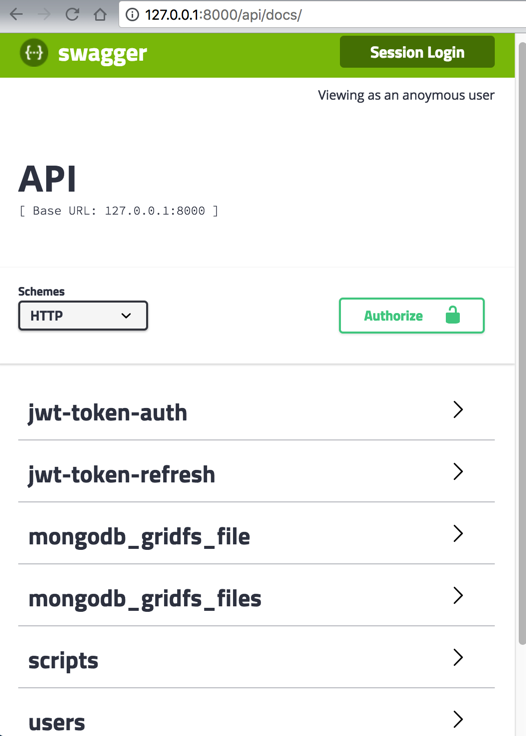
希望看到:
全部的API文档,包括比如用户组user group之类的
别人说是:
此处的:
http://127.0.0.1:8000/api/docs/
内部是和:
共享的session
-》通过先去登录
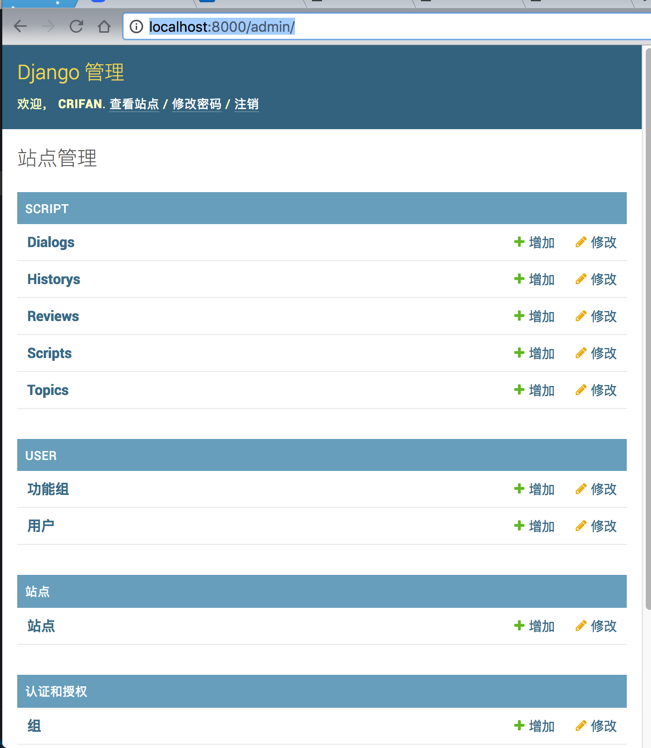
然后再去刷新:
http://127.0.0.1:8000/api/docs/
即可看到全部API的文档。
但是此处还是不行:
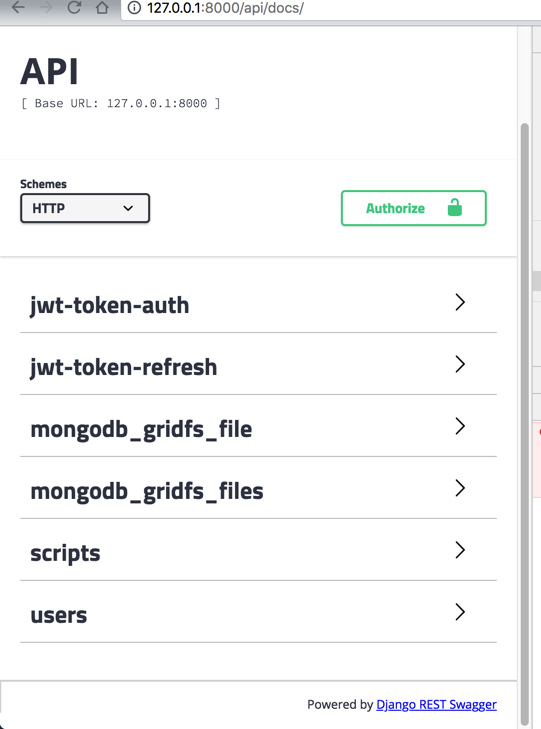
试了各种办法,都不行:
Command+Shift+R 强制重新刷新页面
禁止浏览器缓存
彻底删除本地session和storage:
Clear site data:
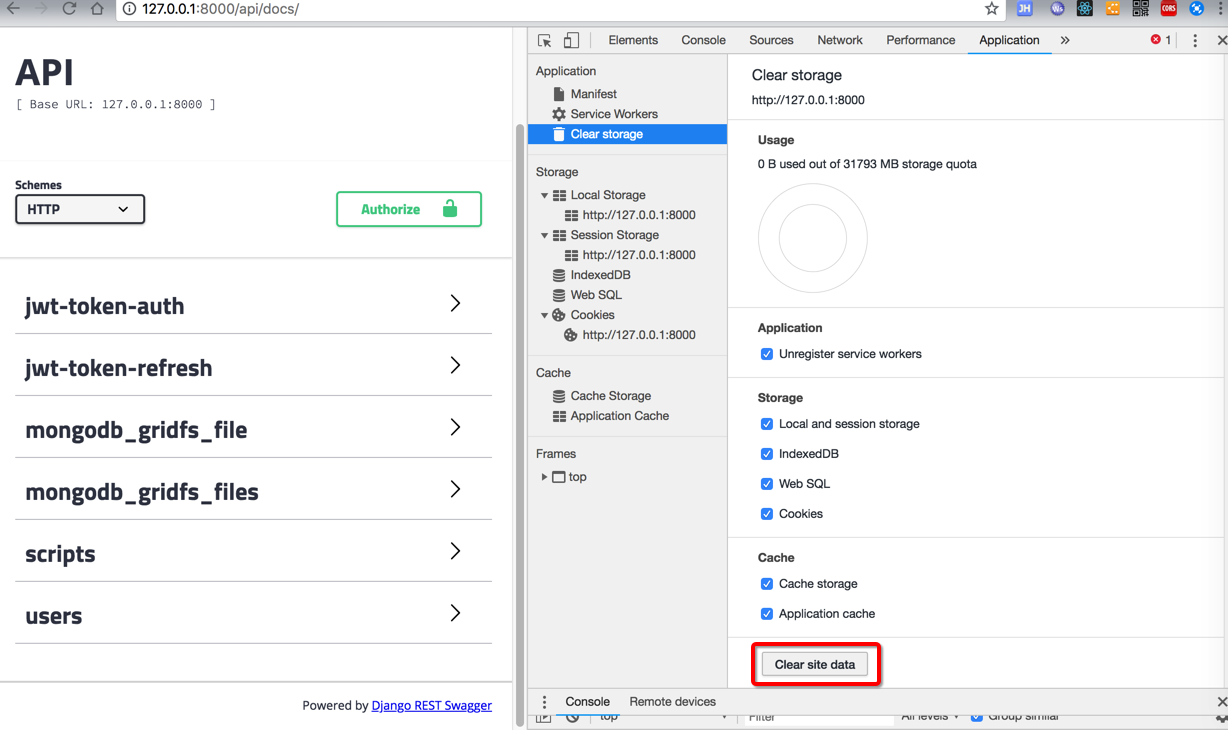
问题依旧。
暂时去掉session共享:
NaturlingCmsServer/conf/development/settings.py
<code># django-restframework and jwt settings
REST_FRAMEWORK = {
    'DEFAULT_PERMISSION_CLASSES':
    ('rest_framework.permissions.IsAuthenticated', ),
    # 'DEFAULT_AUTHENTICATION_CLASSES':
    # ('rest_framework_jwt.authentication.JSONWebTokenAuthentication',
    #  'rest_framework.authentication.SessionAuthentication',
    #  'rest_framework.authentication.BasicAuthentication', ),
    'DATETIME_FORMAT': "%Y-%m-%d %H:%M:%S",
    'DEFAULT_PAGINATION_CLASS':
    'apps.core.pagination.StandardResultsSetPagination',
}
</code>
再重新启用。
问题依旧。
换个端口 8000换成比如8899:
<code>python3 ./manage.py runserver_plus localhost:8899
</code>
->
对应地址变为:
Django后台:
api 文档:
http://127.0.0.1:8899/api/docs/
问题依旧。
根源问题看起来是:
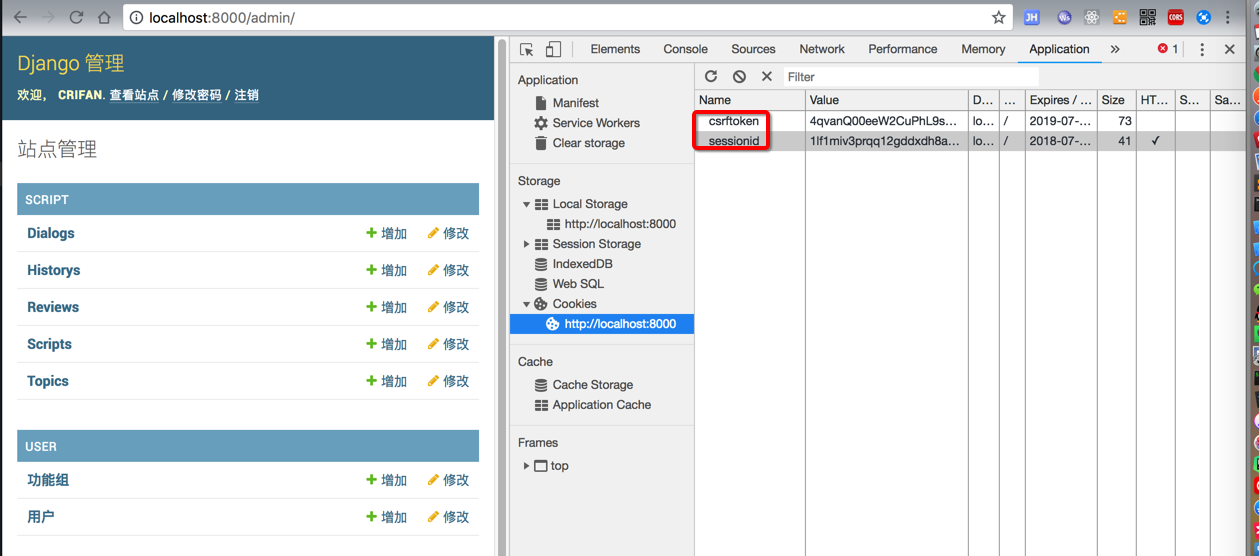
中的两个session:
csrftoken
sessionid
始终没有同步到:
http://127.0.0.1:8000/api/docs/
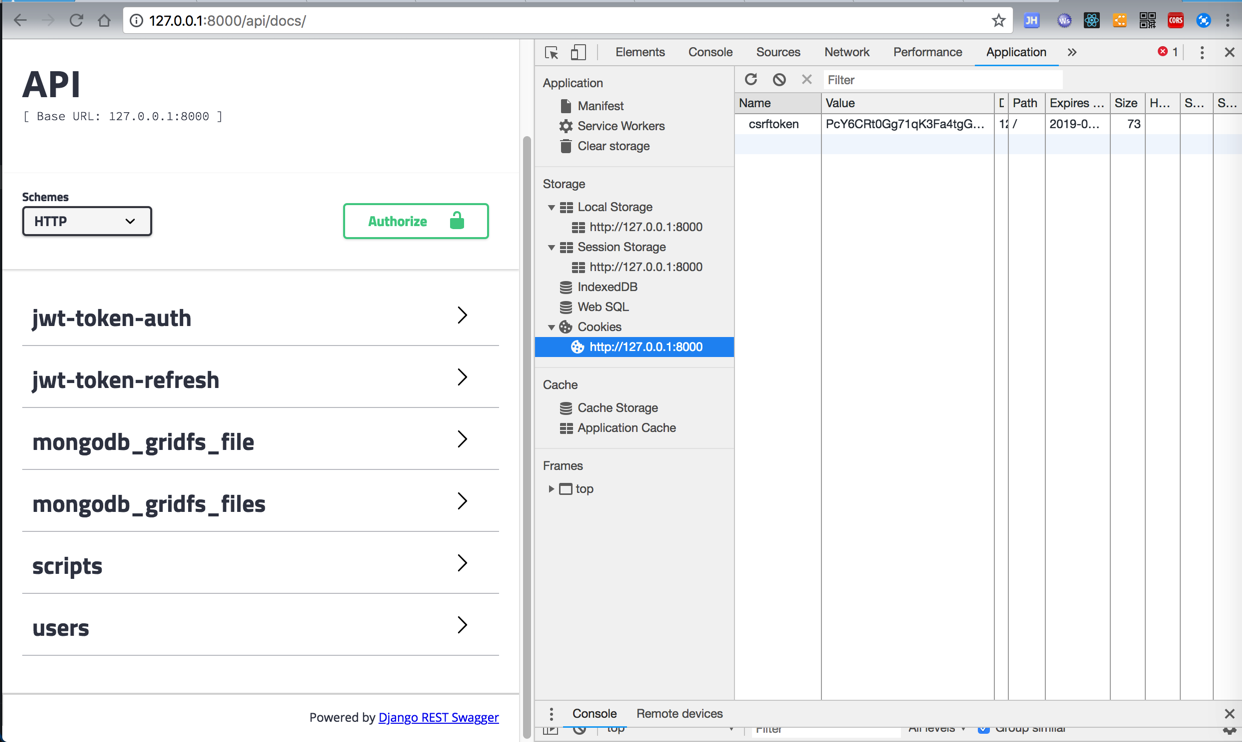
api docs这里只有一个csrftoken,且值不一样
-》说明cookie没有同步过来
难道是:
REST_FRAMEWORK中的:
DEFAULT_AUTHENTICATION_CLASSES
这几个值 没有生效?
但是为何别人那里是可以的?
另外:
http://127.0.0.1:8000/api/docs/
此处始终是:
Viewing as an anoymous user
而别人登录后,是:
You are logged in as: xxx
django swagger api docs session share not work
python 3.x – Django Rest Framework Session + Token Auth issue – Stack Overflow
No way to document parameters · Issue #549 · marcgibbons/django-rest-swagger
Authentication – Django REST framework
Modern Django — Part 2: REST APIs, Apps, and Django REST Framework
How to Use RESTful APIs with Django
Problems with Swagger | Hacker News
django swagger Viewing as an anonymous user
SWAGGER_SETTINGS — django-rest-swagger 0.3.10 documentation
All urls are not mapped by swagger · Issue #562 · marcgibbons/django-rest-swagger
<code>SWAGGER_SETTINGS = {
    'USE_SESSION_AUTH': False,
    'SECURITY_DEFINITIONS': {
        'oauth2': {
            'type': 'apiKey',
            'description': 'Personal API Key authorization',
            'name': 'Authorization',
            'in': 'header',
        }
    },
    'APIS_SORTER': 'alpha',
    # "JSON_EDITOR": True,
    "SHOW_REQUEST_HEADERS": True,
    "VALIDATOR_URL": False,
    "api_key": 'veristoken fbexxx74c54', # An API key
}
</code>
好像可以自己添加设置SWAGGER_SETTINGS的USE_SESSION_AUTH为true?
Django rest framework Anonymous user is always Authenticated – Stack Overflow
django swagger 无法看到全部api
django-rest-framework 自定义swagger – 简书
Settings – Django REST Swagger
marcgibbons/django-rest-swagger: Swagger Documentation Generator for Django REST Framework
django-rest-swagger,用于 Django REST框架的Swagger文档生成器,下载django-rest-swagger的源码_GitHub_帮酷
Django REST Swagger 登录
Swagger 使用方法 – ShaunChen – 博客园
Django Rest Framework – 实例PartyDemo 之 API文档 – CSDN博客
django-rest-swagger的优化使用 – CSDN博客
去试试一些配置
<code>REST_FRAMEWORK = {
# 'DEFAULT_PERMISSION_CLASSES': ('rest_framework.permissions.IsAuthenticated', ),
'DEFAULT_PERMISSION_CLASSES': ('rest_framework.permissions.AllowAny', ),
</code>
结果,问题依旧。
加上了:
<code>SWAGGER_SETTINGS = {
    # 基础样式
    'SECURITY_DEFINITIONS': {
        "basic":{
            'type': 'basic'
        }
    },
    # 如果需要登录才能够查看接口文档, 登录的链接使用restframework自带的.
    'LOGIN_URL': 'rest_framework:login',
    'LOGOUT_URL': 'rest_framework:logout',
    # 'DOC_EXPANSION': None,
    # 'SHOW_REQUEST_HEADERS':True,
    # 'USE_SESSION_AUTH': True,
    # 'DOC_EXPANSION': 'list',
    # 接口文档中方法列表以首字母升序排列
    'APIS_SORTER': 'alpha',
    # 如果支持json提交, 则接口文档中包含json输入框
    'JSON_EDITOR': True,
    # 方法列表字母排序
    'OPERATIONS_SORTER': 'alpha',
    'VALIDATOR_URL': None,
}

</code>
问题依旧。
去找找,为何此处的session共享的配置:
<code>    'DEFAULT_AUTHENTICATION_CLASSES': (
        'rest_framework_jwt.authentication.JSONWebTokenAuthentication',
        'rest_framework.authentication.SessionAuthentication',
        'rest_framework.authentication.BasicAuthentication',
    ),
</code>
不生效。
django DEFAULT_AUTHENTICATION_CLASSES session share not work
python – Django csrf_exempt not working with SessionAuthentication – Stack Overflow
python – Django Rest not working with session authentication – Stack Overflow
django SessionAuthentication not work
Authentication for django-rest-framework with django-rest-auth — /var/
User authentication in Django | Django documentation | Django
期间,还发现一个事情:
别人Mac本地是用pyenv的虚拟环境去搭建环境的,
但并没有说明,导致我本地没有用虚拟环境,直接用本地Mac已有的Python3的环境去搭建和安装库的
-》对此虽然install时是用:
requirements.txt
指定了具体的版本
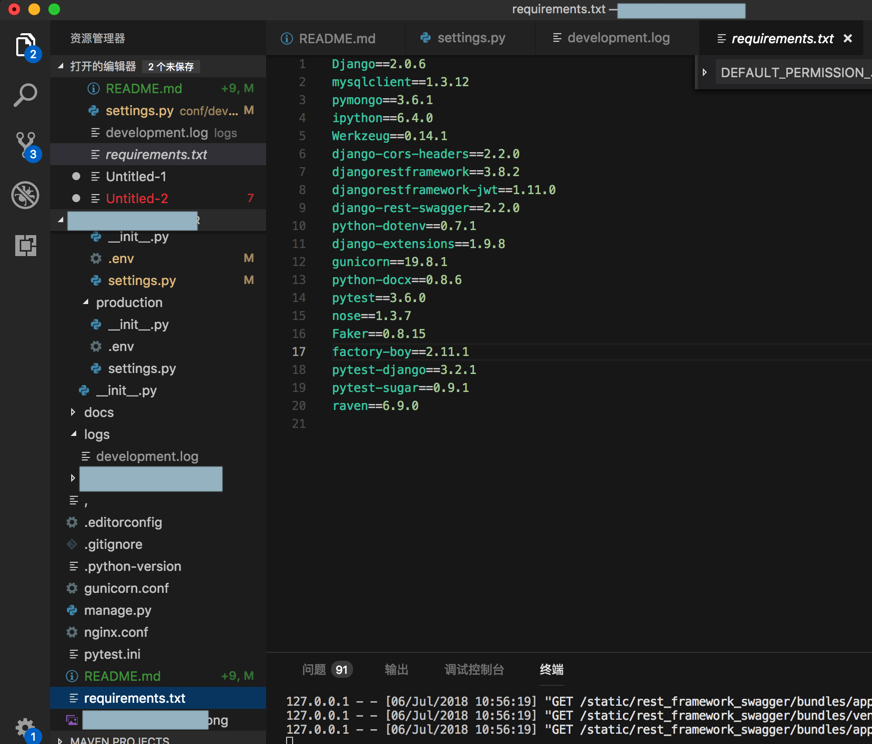
-〉但是也难以完全保证:
我的没有虚拟环境的和别人的有虚拟环境的,
到底会不会影响后续开发的。
不过,后来是发现此处问题的原因了:
之前打开admin页面是用的localhost:
而打开api docs页面是用的127.0.0.1:
http://127.0.0.1:8000/api/docs/
导致domain是localhost的admin页面的cookie:
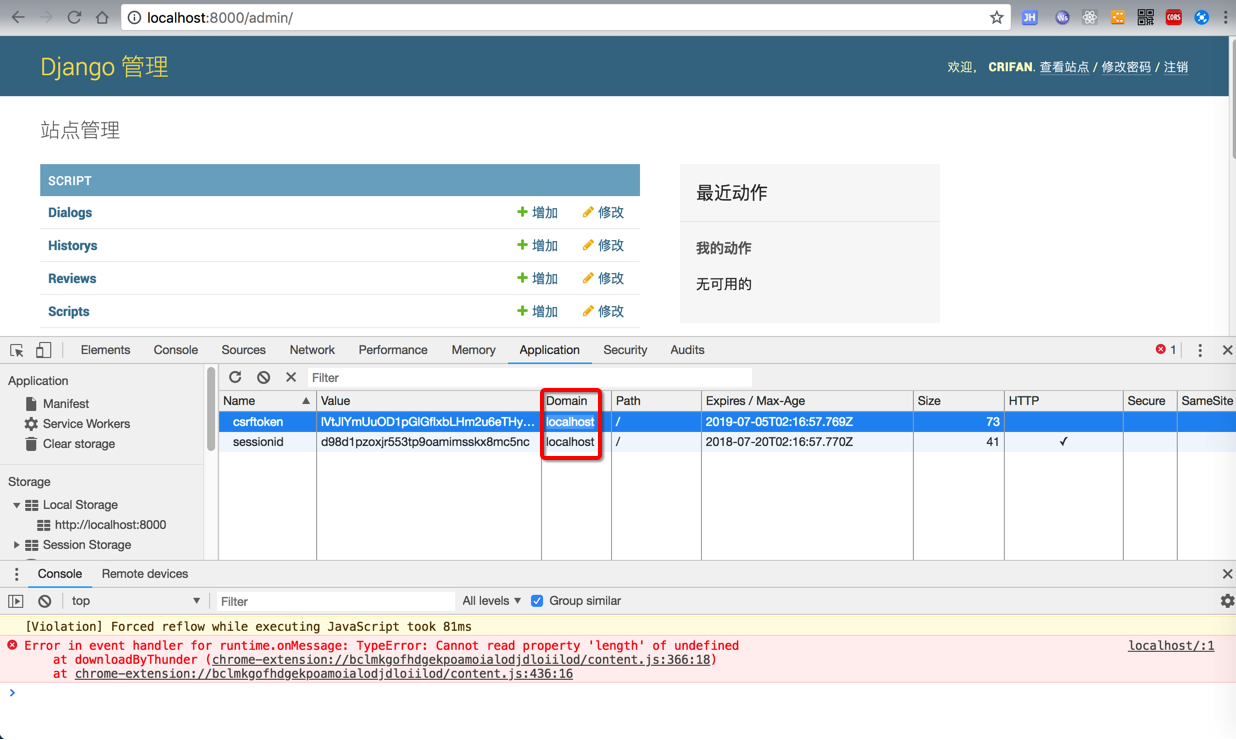
无法共享到:
http://127.0.0.1:8000/api/docs/
中。
解决办法是:
改为:
http://localhost:8000/api/docs/
即可:
共享过来cookie了
显示:You are logged in as: xxx
看到全部的api的接口
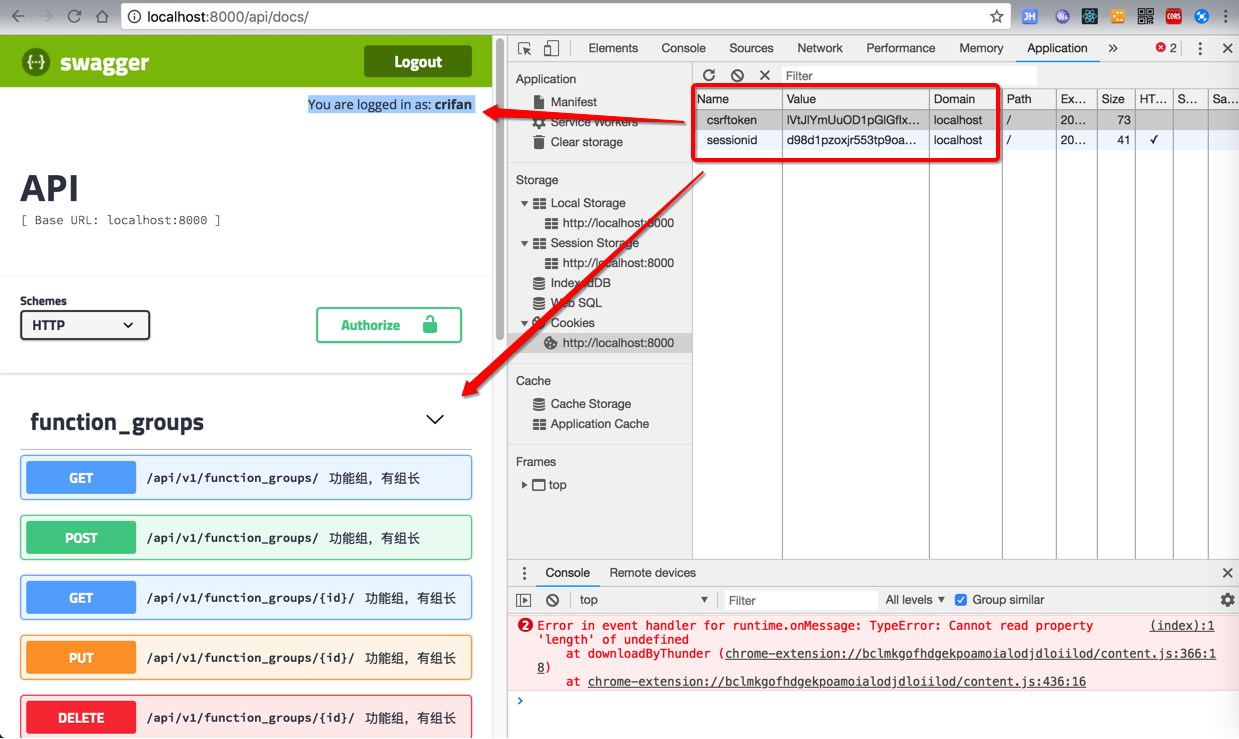
【总结】
此处之所以虽然配置了:
NaturlingCmsServer/conf/development/settings.py
<code>REST_FRAMEWORK = {
    'DEFAULT_PERMISSION_CLASSES': (
        'rest_framework.permissions.IsAuthenticated',
    ),
    'DEFAULT_AUTHENTICATION_CLASSES': (
        'rest_framework_jwt.authentication.JSONWebTokenAuthentication',
        'rest_framework.authentication.SessionAuthentication',
        'rest_framework.authentication.BasicAuthentication',
    ),
}
</code>
对应后台管理页面:
是正常的,也可以登录的,也可以看到登录后的cookie:csrftoken和sessionid
但是由于此处不小心把swagger的api docs页面地址:
http://localhost:8000/api/docs/
写成了:
http://127.0.0.1:8000/api/docs/
导致cookie无法共享和生效
导致无法看到全部的API。
解决办法是:
地址换成:
http://localhost:8000/api/docs/
即可。
原因是:
之前自己在(帮别人补充完整)文档时,
即写了 localhost 也写了 127.0.0.1
结果不小心打开api文档地址时就用了:
http://127.0.0.1:8000/api/docs/
-》但是更深层的原因则是:
此处的别人的做法:
让swagger的api docs所能看到的内容,是根据另外一个
的是否登录
(登录后有cookie(包括sessionid),共享到另外的页面)
所决定,本身就是个很隐晦的做法,耦合度太高的做法,不是好做法。