想要设置tab的背景色:

相关已有代码为:
        //6. create tabs
        let viewConversation    = ConversationViewController()
        let viewContact         = ContactViewController()
        let viewFile            = FileViewController()
        let viewFavorite        = FavoriteViewController()
        let viewMy              = MyViewController()

        let nvcConversation = UINavigationController(rootViewController: viewConversation)
        nvcConversation.tabBarItem = UITabBarItem(title: mainTabs[0], image: UIImage(named:"tab_conversation"), tag:0)
        nvcConversation.tabBarItem.selectedImage = UIImage(named: "tab_conversation_selected")
        //nvcConversation.tabBarItem.badgeValue = "3"

        let nvcContact = UINavigationController(rootViewController: viewContact)
        nvcContact.tabBarItem = UITabBarItem(title: mainTabs[1], image: UIImage(named:"tab_contact"), tag:1)
        nvcContact.tabBarItem.selectedImage = UIImage(named: "tab_contact_selected")

        let nvcFile = UINavigationController(rootViewController: viewFile)
        nvcFile.tabBarItem = UITabBarItem(title: mainTabs[2], image: UIImage(named:"tab_file"), tag:2)
        nvcFile.tabBarItem.selectedImage = UIImage(named: "tab_file_selected")

        let nvcFavorite = UINavigationController(rootViewController: viewFavorite)
        nvcFavorite.tabBarItem = UITabBarItem(title: mainTabs[3], image: UIImage(named:"tab_favorite"), tag:3)
        nvcFavorite.tabBarItem.selectedImage = UIImage(named: "tab_favorite_selected")

        let nvcMy = UINavigationController(rootViewController: viewMy)
        nvcMy.tabBarItem = UITabBarItem(title: mainTabs[4], image: UIImage(named:"tab_my"), tag:4)
        nvcMy.tabBarItem.selectedImage = UIImage(named: "tab_my_selected")

        self.viewControllers = [nvcConversation, nvcContact, nvcFile, nvcFavorite, nvcMy]

        //set bar item font
        let barItemFont = FontMainTab
        for nvcController in self.viewControllers!{
            nvcController.tabBarItem.setTitleTextAttributes([NSFontAttributeName: barItemFont], forState: UIControlState.Normal)
        }
[解决过程]
1.搜:
swift tab background color
参考:
试了试:
UITabBar.appearance().tintColor = UIColor.purpleColor()
效果:

不是所要的。
       UITabBar.appearance().tintColor = UIColor.purpleColor()
        UITabBar.appearance().barTintColor = UIColor.yellowColor()
效果:

达到所需要的效果了。
再去调节:
let ColorMainTabBackground:UIColor = UIColor(hexString: "#f6f6f6")!

        //UITabBar.appearance().tintColor = UIColor.purpleColor()
        UITabBar.appearance().barTintColor = ColorMainTabBackground
最终的效果:

官网的解释是:
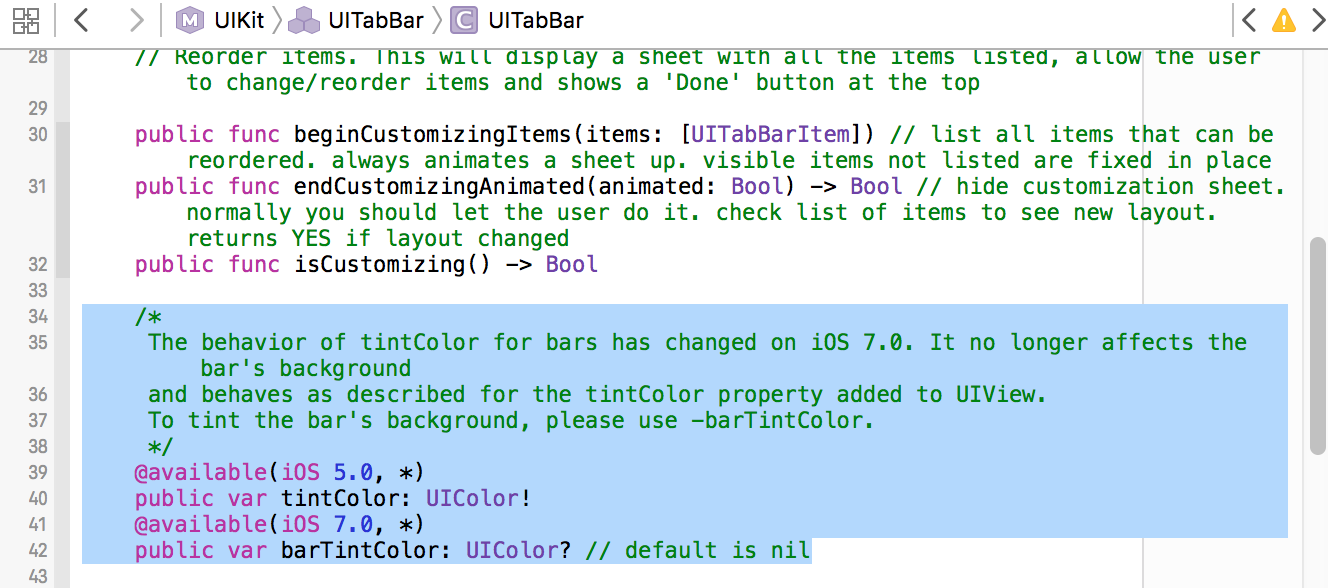
[总结]
想要设置tab的背景色,实际上是:
设置UITabBar的背景色,对应设置代码为:
UITabBar.appearance().barTintColor = UIColor.yellowColor()
即可。
转载请注明:在路上 » [已解决]swift设置Tab的背景色