去访问:
<code>http://localhost:8080/uapp/?accessToken=75872da5-56b8-4fd3-96be-7ad69d56a6e4
</code>
内部调用了:
<code>
getUserDetail() {
console.log(`getUserDetail`);
const apiPrefix = SinglePointLogin.BASE_URL;
const url = `getUserDetail.do`;
console.log(`apiPrefix=${apiPrefix},url=${url}`);
let strToCalcMd5 = "accessToken=" + this.props.accessToken + "clientId=" + SinglePointLogin.CLIENTID + SinglePointLogin.CLIENTSECRET;
console.log(`strToCalcMd5=${strToCalcMd5}`);
let md5Sign = calcMd5Sign(strToCalcMd5);
console.log(`md5Sign=${md5Sign}`);
let postJson = {
"accessToken": this.props.access_token,
"clientId": SinglePointLogin.CLIENTID,
'sign': md5Sign
};
console.log(postJson);
console.log(JSON.stringify(postJson));
this.props.fetch(
url,
{
method : "POST",
headers : {
'Content-Type': 'application/json'
},
body: JSON.stringify(postJson)
},
(data) => {
console.log(data);
console.log(JSON.stringify(data));
},
apiPrefix
);
}
// 公用的获取数据的方法
// fetch(path, params = {}, callback) {
fetch(path, params = {}, callback, apiPrefex = null) {
console.log(`INITIAL fetch: path=${path},params=${JSON.stringify(params)}`);
// console.log(`window.userInfoDict=${JSON.stringify(window.userInfoDict)}`);
let authorizationValue = "";
if ( window.userInfoDict &&
window.userInfoDict.tokenid &&
window.userInfoDict.currentCowfarmId
)
{
authorizationValue = `Bearer ${window.userInfoDict.tokenid}_${window.userInfoDict.currentCowfarmId}`;
}
if (authorizationValue !== "") {
if (params.headers) {
console.debug(`params.headers not empty: params.headers=${JSON.stringify(params.headers)}`);
} else {
params.headers = {};
}
params.headers.Authorization = authorizationValue;
console.info(`after added Authorization: path=${path}, params=${JSON.stringify(params)}`);
}
console.time(path);
let curApiPrefix = API;
if (apiPrefex) {
curApiPrefix = apiPrefex;
}
console.log(`curApiPrefix=${curApiPrefix}`);
let fullPath = curApiPrefix + path;
console.log(`fullPath=${fullPath}`);
// return fetch(API + path, params)
return fetch(fullPath, params)
.then(r => r.json())
.catch(e => ({ code: -9999, message: e}))
.then((res) => {
console.timeEnd(path);
const { code, data, message } = res;
if (code === 200 && data) {
callback && callback(data);
} else {
let errMsg = `fetch path=${path} with params=${JSON.stringify(params)} error code=${code} message=${message}, data=${JSON.stringify(data)}`;
throw errMsg;
}
})
.catch(err => {
console.error(err);
});
},
</code>但是出错:
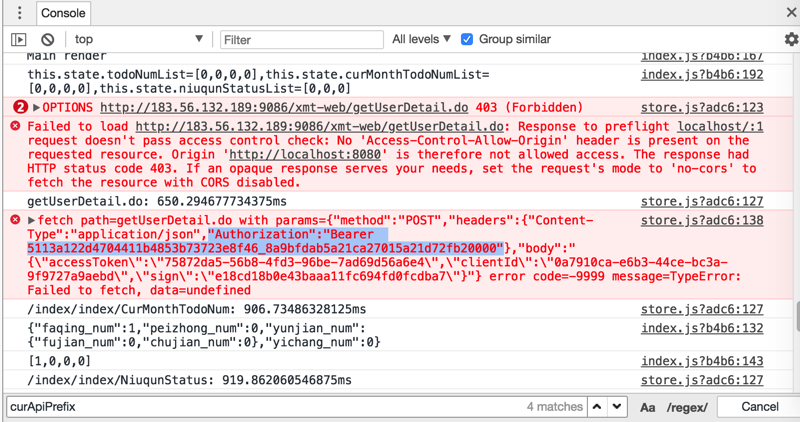
<code>store.js?adc6:123 OPTIONS http://183.56.132.189:9086/xmt-web/getUserDetail.do 403 (Forbidden)
(anonymous) @ store.js?adc6:123
fetch @ store.js?adc6:85
getUserDetail @ index.js?b4b6:82
Main @ index.js?b4b6:53
createComponent @ component-recycler.js?d070:14
renderComponent @ component.js?4adf:108
renderComponent @ component.js?4adf:114
setComponentProps @ component.js?4adf:31
buildComponentFromVNode @ component.js?4adf:219
idiff @ diff.js?d966:87
innerDiffNode @ diff.js?d966:203
idiff @ diff.js?d966:125
innerDiffNode @ diff.js?d966:203
idiff @ diff.js?d966:125
diff @ diff.js?d966:28
renderComponent @ component.js?4adf:130
renderComponent @ component.js?4adf:114
renderComponent @ component.js?4adf:114
setComponentProps @ component.js?4adf:31
buildComponentFromVNode @ component.js?4adf:219
idiff @ diff.js?d966:87
diff @ diff.js?d966:28
render @ component.js?4adf:260
init @ index.js?1fdf:13
(anonymous) @ index.js?1fdf:31
(anonymous) @ bundle_773d1fd46ee9a63e4d81.js:4472
__webpack_require__ @ bundle_773d1fd46ee9a63e4d81.js:660
fn @ bundle_773d1fd46ee9a63e4d81.js:86
(anonymous) @ bundle_773d1fd46ee9a63e4d81.js:9822
__webpack_require__ @ bundle_773d1fd46ee9a63e4d81.js:660
(anonymous) @ bundle_773d1fd46ee9a63e4d81.js:709
(anonymous) @ bundle_773d1fd46ee9a63e4d81.js:712
localhost/:1 Failed to load http://183.56.132.189:9086/xmt-web/getUserDetail.do: Response to preflight request doesn't pass access control check: No 'Access-Control-Allow-Origin' header is present on the requested resource. Origin 'http://localhost:8080' is therefore not allowed access. The response had HTTP status code 403. If an opaque response serves your needs, set the request's mode to 'no-cors' to fetch the resource with CORS disabled.
</code>
看起来像是CORS的问题
此处,去开启之前Chrome的CORS插件:

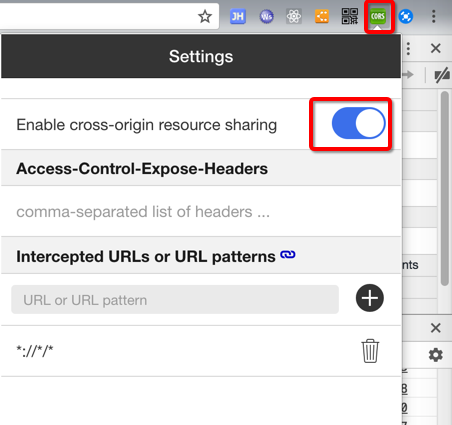
但是问题依旧。
感觉本身也不像是CORS的问题:
因为此处调用另外的服务器的API:
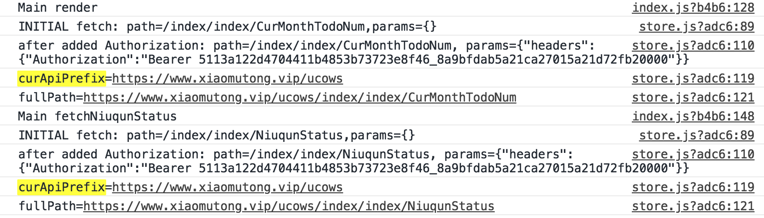
本身是没有问题的。
怎么感觉像是API接口
http://ip:9086/xmt-web/getUserDetail.do
的问题。
但是用postman去测试,貌似至少又是正常的可以访问的:
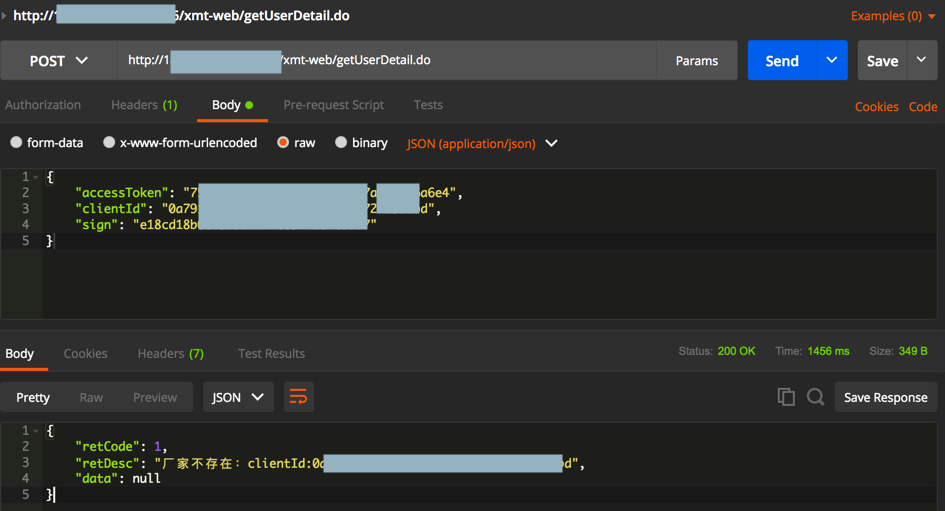
搜:
js Failed to load Response to preflight request doesn’t pass access control check No Access-Control-Allow-Origin header is present on the requested resource
javascript – Response to preflight request doesn’t pass access control check – Stack Overflow
“The code in the question triggers a CORS preflight—since it sends an Authorization header.”
和我刚注意到的现象:
错误信息中,还有个:
<code>store.js?adc6:138 fetch path=getUserDetail.do with params={"method":"POST","headers":{"Content-Type":"application/json","Authorization":"Bearer 51xxx00"},"body":"{\"accessToken\":\"75872da5-56b8-4fd3-96be-7ad69d56a6e4\",\"clientId\":\"0axxxebd\",\"sign\":\"exxxa7\"}"} error code=-9999 message=TypeError: Failed to fetch, data=undefined
</code>
其中有个:Authorization字段
-》此处不应该有的
-〉所以去掉看看
果然就可以了:

【总结】
此处,在Chrome中调试api接口,之前调用别的某个服务器的很多的API是正常的。
注:和是否开启Chrome的CORS插件没关系。
但是调用另外一个服务器的API的,结果报错:
Failed to load Response to preflight request doesn’t pass access control check No Access-Control-Allow-Origin header is present on the requested resource
原因是:
在调用新服务器的API时,post时,额外传入了个错误的参数:
“Authorization”:”Bearer xxx”
导致出现此处的CORS的错误。
解决办法是:
去掉此处本身就是错误的Authorization,即可。
详见:
的:
Cross-Origin Resource Sharing (CORS) – HTTP | MDN
转载请注明:在路上 » 【已解决】reactjs中去post别的http的API出错:Failed to load Response to preflight request doesn’t pass access control check No Access-Control-Allow-Origin header is present on the requested resource